
- Local LLMs
- Local AI
- LLMs
- Quantization
- Guides
What Is Q4_K_M? GGUF Quantization Explained (2026)
What Q4_K_M means in a GGUF file, how it compares with Q4_K_S, Q5_K_M, Q6_K, Q8_0, IQ4_XS and UD-Q4_K_XL, and which quantization to download for your RAM.
By PickZeal
Updated 12 min read
Key takeaways
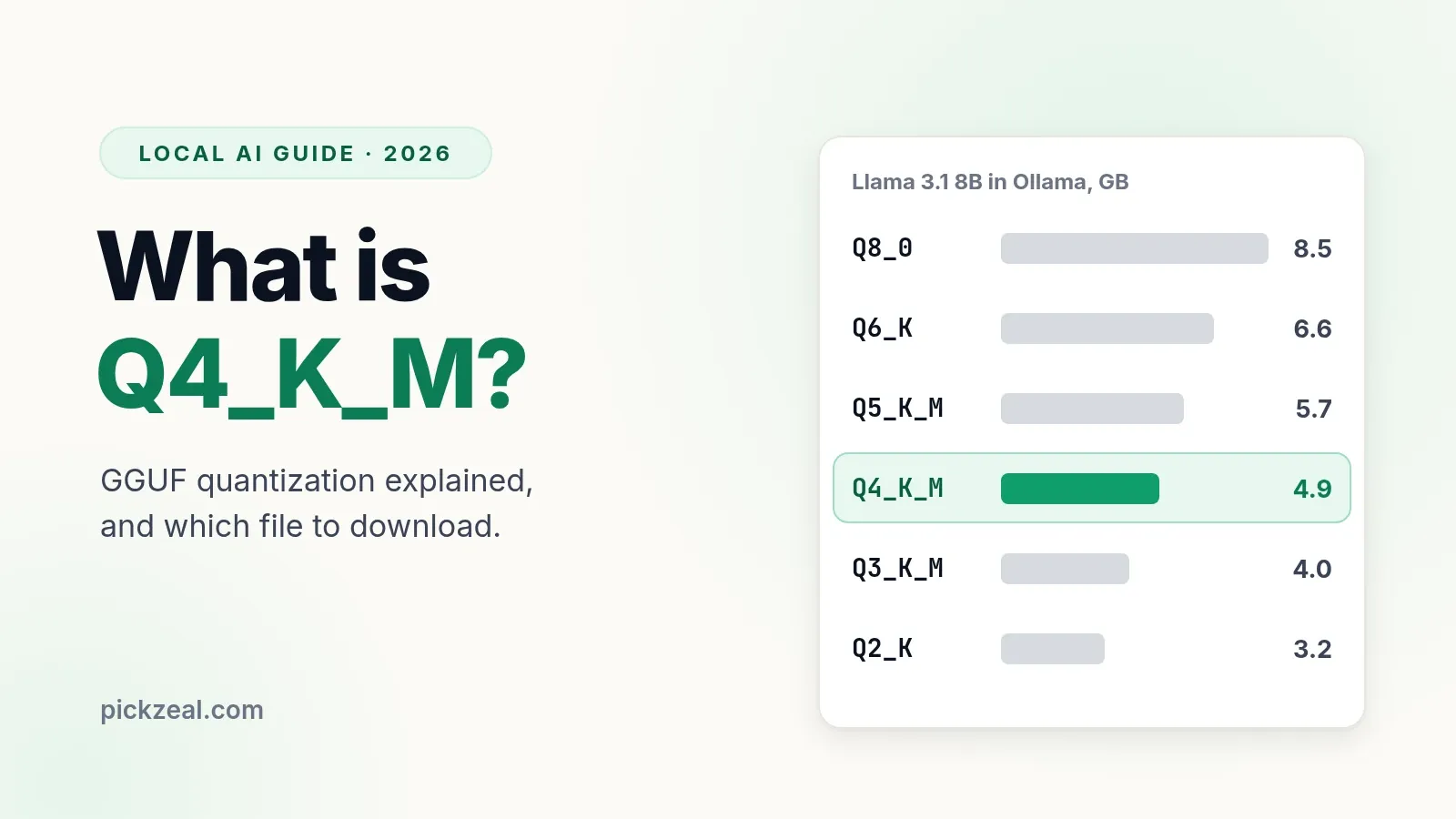
- Q4_K_M is a GGUF quantization: Q = quantized, 4 = 4-bit tier, K = the k-quant method, M = medium mix. It averages about 4.9 bits per weight, so a model needs about 0.6 GB per billion parameters.
- It is about 30% of the original 16-bit size. In llama.cpp's own tests it raised perplexity by about 0.9%, against 4.2% for the older Q4_0 at a similar size.
- Q4_K_M is the right default when memory is tight. If you have memory left over after context, Q5_K_M (about 16% bigger) or Q6_K (about 34% bigger) gets you closer to the original.
- Q8_0 is practically identical to the original but almost twice the size of Q4_K_M and about 30% slower to generate. A bigger model at Q4_K_M usually beats a smaller one at Q8_0.
- Avoid Q2 and Q3 on small models. For Gemma, prefer the official QAT builds; on Unsloth repos, UD-Q4_K_XL is a good alternative to Q4_K_M.
Q4_K_M is a quantization type for GGUF model files. It stores most of a model’s weights with 4 bits instead of 16, using llama.cpp’s “k-quant” method and a “medium” mix that keeps a few sensitive tensors at 6 bits. On average it uses about 4.9 bits per weight, which shrinks a model to about 30% of its original size with a small loss in quality. That is why it is the default download in Ollama and the first file most people pick in LM Studio.
This guide explains what each part of the name means, how Q4_K_M compares with the other files you see on a Hugging Face model page (Q4_K_S, Q5_K_M, Q6_K, Q8_0, IQ4_XS, Q4_0, UD-Q4_K_XL and the QAT builds), and which one to download for the memory you have.
The numbers come from llama.cpp’s own published tests and from the Ollama library, checked on November 22, 2026. We did not run new benchmarks for this guide; where a number comes from an older or vendor test, we say so. For the bigger picture, see our guide on how to run an LLM locally.
The short answer: what Q4_K_M means
Q4_K_M breaks down into four parts:
| Part | Meaning |
|---|---|
| Q | Quantized: the weights are stored with fewer bits than the 16-bit original |
| 4 | The 4-bit tier: most weights use 4 bits |
| K | The k-quant method: weights are packed in blocks of 256, each with its own scales |
| M | Medium mix: some sensitive tensors get 6 bits. S is a smaller mix, L a larger one |
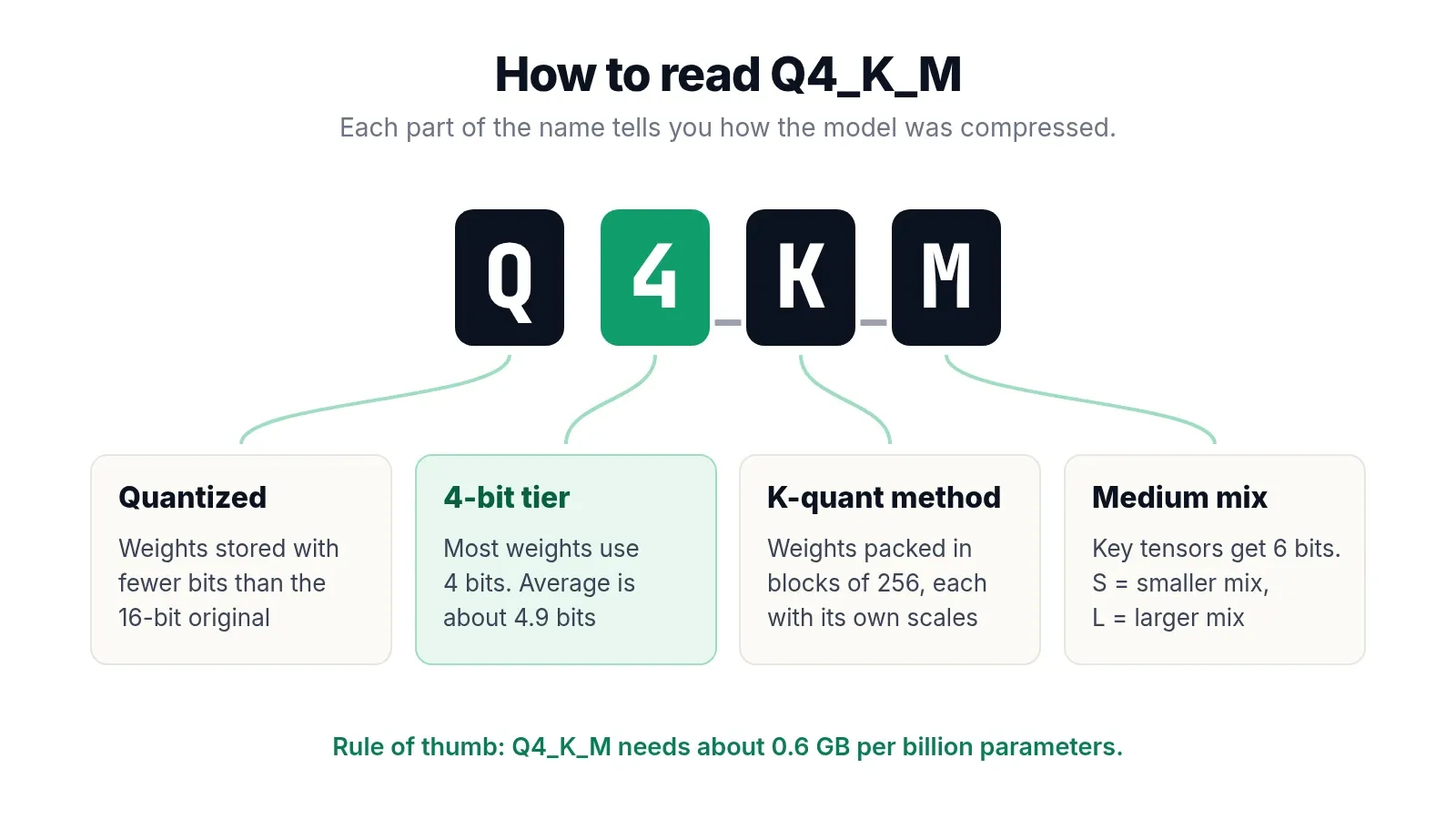
The practical rule: at Q4_K_M a model needs about 0.6 GB per billion parameters, plus memory for context. A 4B model is about 2.5 GB, an 8B model about 4.9 GB, a 14B model about 9 GB.
What quantization does, in plain English
An LLM is mostly a very large table of numbers called weights. In the original release, each weight is a 16-bit number, so an 8B model is about 16 GB. That is too big for most laptops, and it is slow, because the computer has to read every weight from memory for every word it writes.
Quantization rounds those weights to fewer bits. Instead of storing each number precisely, it stores a short code plus a shared scale for a small group of weights. The model gets much smaller and faster, and loses a little accuracy, the way a JPEG photo is much smaller than the raw file and looks almost the same.
Two things follow:
- Fewer bits means a smaller file and faster generation. On a CPU or a Mac, generation speed depends mostly on how many bytes are read per token, so a 4-bit model writes text two to three times faster than the 16-bit original.
- Fewer bits also means more error. The error is small down to about 4 bits and grows quickly below that.
GGUF itself is not a quantization method. It is the file format used by llama.cpp, Ollama, LM Studio and similar apps. One GGUF file holds the weights, the tokenizer and the model settings. The same model can be saved as GGUF at many quantization levels, which is why a single Hugging Face repository lists a dozen files.
How to read a GGUF file name
Most of the letters you see on a model page fall into a few families:
| Name | Family | What it means |
|---|---|---|
| Q4_0, Q4_1, Q5_0, Q5_1, Q8_0 | Legacy quants | Simple blocks of 32 weights with one scale (and, for _1, an offset). Q8_0 is still widely used |
| Q2_K to Q6_K, with _S, _M, _L | K-quants | Blocks of 256 weights with their own scales. The letter sets how many tensors get extra bits |
| IQ1_S to IQ4_XS, IQ4_NL | I-quants | Use an importance matrix and non-uniform value grids. Best quality per bit at 2 to 4 bits |
| imatrix, i1 | Importance matrix | The quantizer was guided by sample text, so important weights lose less. Works with i-quants and k-quants |
| UD-Q4_K_XL | Unsloth Dynamic | Unsloth’s own per-layer mix of quant types |
| QAT, qat-q4_0 | Quantization-aware training | The model was trained to work well at Q4_0 |
| F16, BF16 | Unquantized | The original 16-bit weights |
| MXFP4, NVFP4, MXFP8 | Floating-point formats | Small floating-point formats. MXFP4 is gpt-oss’s native format; NVFP4 is aimed at recent NVIDIA GPUs |
The numbers after the model name, such as Qwen3.5-9B-Q4_K_M.gguf, always describe the quantization, not the model. The “9B” is the model size; the “Q4_K_M” is how it was compressed.
GGUF quantization types compared
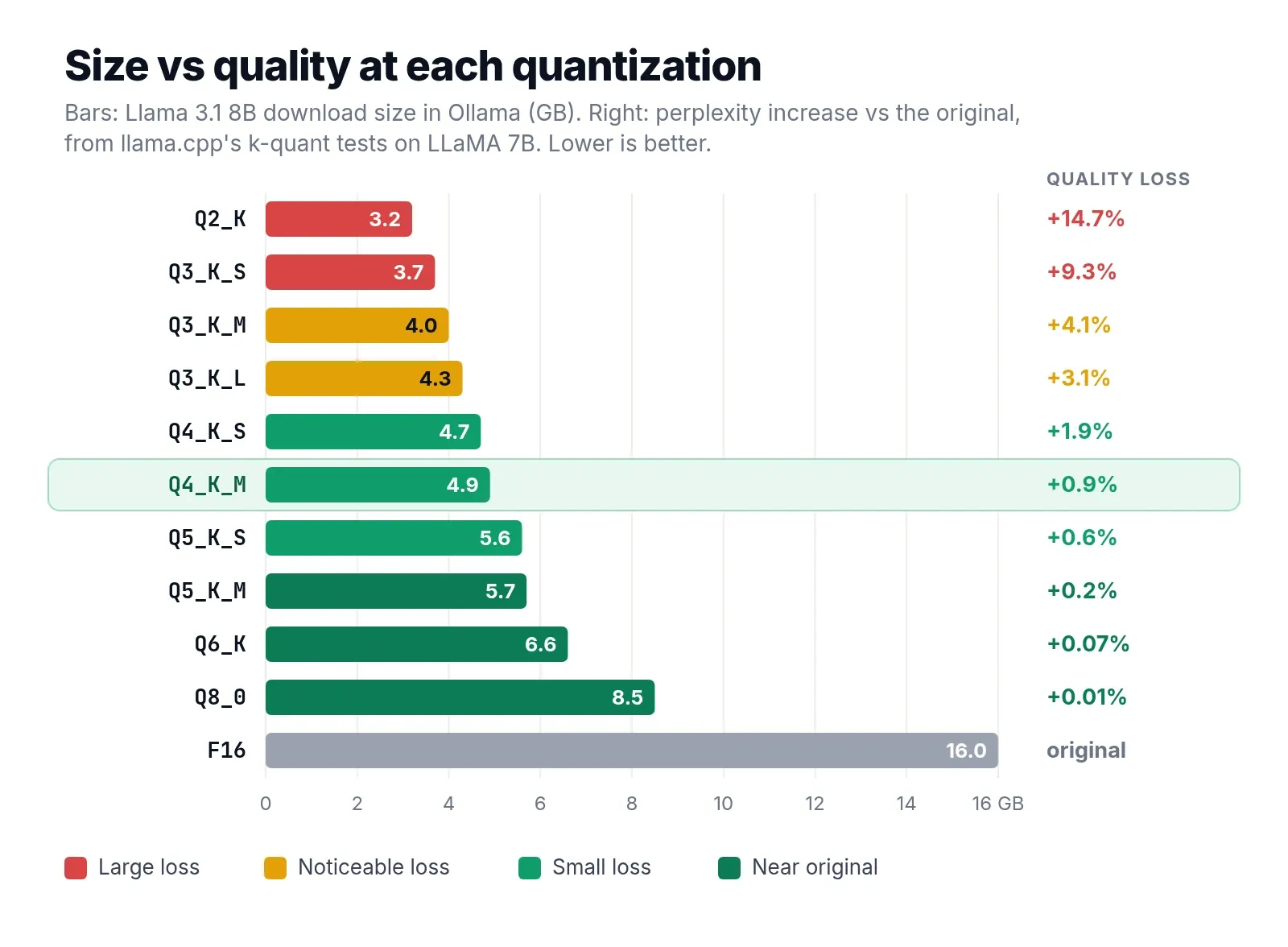
llama.cpp publishes the size and speed of every quant type for Llama 3.1 8B. Its original k-quant tests, from 2023, also measured how much each type raised perplexity (a standard measure of how well a model predicts text; lower is better) on LLaMA 7B.
| Type | Bits per weight | Llama 3.1 8B size | Generation speed* | Perplexity increase** |
|---|---|---|---|---|
| Q2_K | 3.16 | 2.95 GiB | 79.9 tok/s | +14.7% |
| Q3_K_M | 4.00 | 3.74 GiB | 71.7 tok/s | +4.1% |
| IQ4_XS | 4.46 | 4.17 GiB | 77.5 tok/s | not in the 2023 test |
| Q4_K_S | 4.67 | 4.36 GiB | 76.7 tok/s | +1.9% |
| Q4_K_M | 4.89 | 4.58 GiB | 71.9 tok/s | +0.9% |
| Q5_K_M | 5.70 | 5.33 GiB | 67.2 tok/s | +0.24% |
| Q6_K | 6.56 | 6.14 GiB | 58.7 tok/s | +0.07% |
| Q8_0 | 8.50 | 7.95 GiB | 50.9 tok/s | +0.007% |
| F16 | 16.00 | 14.96 GiB | 29.2 tok/s | original |
* From the llama.cpp quantize README, measured on llama.cpp’s test machine. Use the numbers to compare types, not to predict your own speed.
** From llama.cpp’s k-quant pull request and README (June 2023), LLaMA 7B on wikitext.
Two cautions about the quality column:
- Newer models lose more. Models trained on far more data, such as Llama 3 and later, tend to degrade more from the same quantization than the 2023 LLaMA models in this test. A 2024 study of Llama 3 quantization found clear losses at low bit widths. Treat the percentages as a best case.
- Perplexity is not the whole story. Researchers now prefer KL divergence, which measures how far the quantized model’s answers drift from the original’s, token by token. Two models can have similar perplexity and still disagree on many answers.
The shape of the table is the useful part: quality loss is tiny from Q8_0 down to Q5_K_M, still small at Q4_K_M, and climbs fast below 4 bits.
Q4_K_M vs Q4_K_S
Q4_K_S stores all the main tensors at 4-bit. Q4_K_M keeps about half of the attention value tensors and feed-forward output tensors at 6-bit, because those affect quality the most.
| Q4_K_S | Q4_K_M | |
|---|---|---|
| Bits per weight (Llama 3.1 8B) | 4.67 | 4.89 |
| Size | 4.36 GiB | 4.58 GiB |
| Perplexity increase (LLaMA 7B) | +1.9% | +0.9% |
Q4_K_S saves about 5% of the size and loses roughly twice as much quality. Choose it only when Q4_K_M misses your memory budget by a few hundred megabytes.
Q4_K_M vs Q5_K_M
Q5_K_M uses the same structure with 5-bit weights and the same tensors at 6-bit. It is about 16% larger (5.33 GiB vs 4.58 GiB for Llama 3.1 8B) and about 7% slower in llama.cpp’s speed test, and it raised perplexity by about 0.24% instead of 0.9%.
Choose Q5_K_M when the model fits with room for your context and you care about tasks that punish small errors: code, structured output such as JSON, tool calling and long reasoning chains. Choose Q4_K_M when memory is tight, or when the extra 16% would push you into a shorter context or a smaller model.
Q4_K_M vs Q6_K vs Q8_0
These three cover most of the “how much quality do I need?” question:
| Q4_K_M | Q6_K | Q8_0 | |
|---|---|---|---|
| Size vs Q4_K_M | 1x | about 1.34x | about 1.74x |
| Speed vs Q4_K_M | 1x | about 18% slower | about 29% slower |
| Perplexity increase (LLaMA 7B) | +0.9% | +0.07% | +0.007% |
Q6_K is already within about 0.1% of the original on perplexity. Q8_0 is practically identical, but it costs almost twice the memory of Q4_K_M for a gain most people cannot see.
The better use of that memory is usually a bigger model. In llama.cpp’s k-quant tests, LLaMA 13B at Q3_K_M (5.9 GB) had lower perplexity than LLaMA 7B at full 16-bit precision (13 GB). On a home computer, a larger model at Q4_K_M almost always beats a smaller model at Q8_0.
Q8_0 makes sense when the model is small enough that memory does not matter, for example a 1B to 4B model on a 16 GB machine, or when you want a reference to compare other quants against.
Q4_K_M vs IQ4_XS: k-quants vs i-quants
IQ4_XS is an i-quant. I-quants use an importance matrix, built by running sample text through the model, and non-uniform value grids, so the bits go where they matter most. At about 4.46 bits per weight, IQ4_XS is roughly 9% smaller than Q4_K_M (4.17 GiB vs 4.58 GiB) with similar quality.
Things to know before you switch:
- Speed depends on your hardware. In llama.cpp’s own speed table IQ4_XS was slightly faster than Q4_K_M, but i-quants can be slower on some CPUs and on Apple Silicon because they need more work to decode. If speed matters, test both with
--verbosein Ollama orllama-benchin llama.cpp. - IQ4_NL is a related 4-bit i-quant that is slightly larger than IQ4_XS (4.68 vs 4.46 bits per weight in llama.cpp’s table). For most people, IQ4_XS is the one to try.
- Below 4 bits, i-quants win clearly. If you must use 2 or 3 bits, IQ3_M, IQ3_XXS or IQ2_M usually beat Q3_K and Q2_K at the same size.
Use IQ4_XS when a model you want misses your memory by a little at Q4_K_M. Otherwise, Q4_K_M is the safer default.
Q4_K_M vs Q4_0, and why QAT Q4_0 is different
Q4_0 is the original 4-bit format: blocks of 32 weights with one scale each, at 4.5 bits per weight. It is simple and fast, but in llama.cpp’s 2023 tests it raised perplexity by about 4.2%, against 0.9% for Q4_K_M. In Ollama, Llama 3.1 8B is 4.7 GB at Q4_0 and 4.9 GB at Q4_K_M, so Q4_K_M gives much better quality for 0.2 GB more.
The exception is QAT, quantization-aware training. Instead of compressing a finished model, Google trained Gemma models with the 4-bit rounding simulated during training, so the weights learn to tolerate it. Google reported that this cut the perplexity drop at Q4_0 by 54% for Gemma 3. Gemma 4 has QAT builds too: in Ollama, gemma4:12b-it-qat is 7.2 GB, smaller than gemma4:12b-it-q4_K_M at 8.0 GB.
So for Gemma models, prefer the official QAT build. For everything else, prefer Q4_K_M over plain Q4_0.
Q4_K_M vs UD-Q4_K_XL (Unsloth Dynamic)
Unsloth, one of the largest publishers of GGUF files on Hugging Face, makes its own “Dynamic” quants, labeled UD. Instead of the fixed recipe behind Q4_K_M, Unsloth chooses the quantization type for each layer separately, based on how sensitive it is, and calibrates with its own dataset. UD-Q4_K_XL is its 4-bit option, at a size close to Q4_K_M.
Unsloth’s own benchmarks show its dynamic quants keeping more of the original model’s behavior than standard quants of the same size, measured by KL divergence. These are vendor benchmarks, but the method is published and the files are free, so it costs nothing to try. If a model’s Unsloth repository has a UD-Q4_K_XL file and it fits, it is a reasonable choice over plain Q4_K_M.
Which quantization should you use?
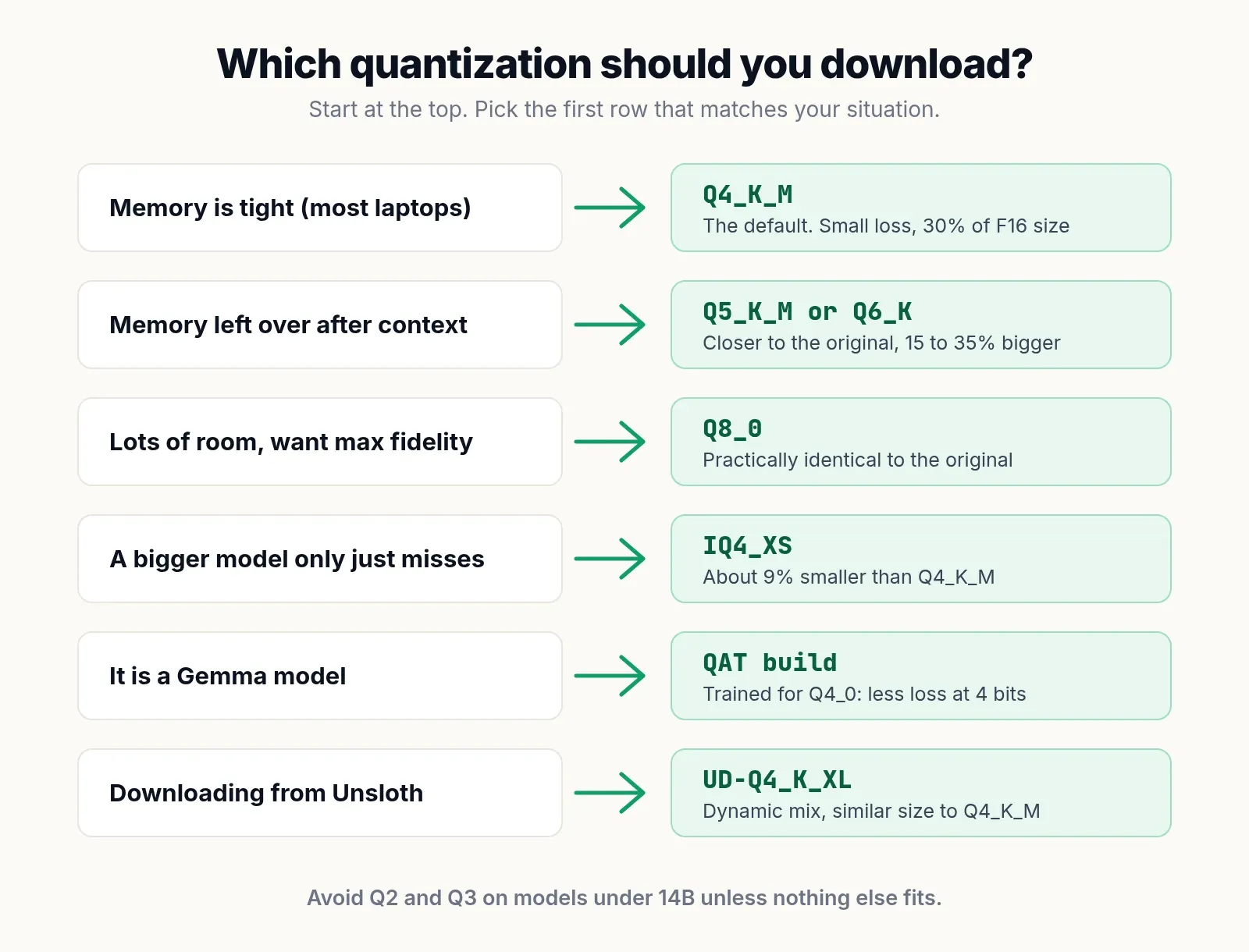
Start with Q4_K_M. Then adjust:
| Your situation | Download |
|---|---|
| Memory is tight (most laptops, 8 to 16 GB of RAM) | Q4_K_M |
| The model fits with memory left over after context | Q5_K_M or Q6_K |
| Lots of room and you want maximum fidelity | Q8_0 |
| A bigger model misses your memory by a little | IQ4_XS, or Q4_K_S |
| It is a Gemma model | The official QAT build |
| The repository is from Unsloth | UD-Q4_K_XL |
| Nothing fits at 4 bits | A smaller model at Q4_K_M, before any Q2 or Q3 |
Bigger model at lower bits, or smaller model at higher bits?
Within the same model family, the bigger model usually wins down to about 4 bits, and often at 3 bits for models of 14B and up. Below that, small models break down: a 7B or 8B model at Q2_K loses noticeably more than the same model at Q4_K_M, and a newer small model at Q4_K_M is usually the better choice.
To estimate whether a quant fits, multiply the parameters by the bits per weight and divide by 8, then add context. For an 8B model at Q4_K_M: 8 x 4.9 / 8 = about 4.9 GB, plus 0.5 to 2 GB for context. Our guides to the best LLM for 8GB RAM and the best local LLM for 16GB RAM show how much memory your operating system leaves free.
How to choose a quantization in Ollama, LM Studio and llama.cpp
Ollama
Most default tags in the Ollama library are Q4_K_M, so ollama run llama3.1 gives you a Q4_K_M file. Some newer models default to other 4-bit builds, such as QAT, NVFP4 or MLX versions on a Mac, so check the model’s tag page if the exact format matters.
To pick another quant, add it to the tag:
ollama run llama3.1:8b-instruct-q5_K_M
ollama run qwen3.5:9b-q8_0
ollama run gemma4:12b-it-qat
You can also run any GGUF file from Hugging Face directly, choosing the quant after the colon:
ollama run hf.co/unsloth/Qwen3.5-9B-GGUF:Q5_K_MRun ollama list afterwards to see the size you actually downloaded.
LM Studio
In LM Studio’s model search, each model shows a list of downloads with the quantization in the name and an estimate of whether it fits your machine. Pick Q4_K_M by default, and trust the “likely too large” warning.
llama.cpp
llama-cli and llama-server can download a specific quant from Hugging Face:
llama-cli -hf unsloth/Qwen3.5-9B-GGUF:Q4_K_MTo make your own quant from a 16-bit GGUF file:
llama-quantize model-bf16.gguf model-Q4_K_M.gguf Q4_K_MQuantizing yourself is useful for fine-tuned models that nobody has published in GGUF yet. For popular models, download a ready-made file; the publishers usually add an importance matrix, which you would have to build yourself.
How we researched this
PickZeal did not run new benchmarks for this guide. Every number comes from a public source, checked on November 22, 2026:
- Bits per weight, sizes and speeds for Llama 3.1 8B come from the llama.cpp quantize README.
- Perplexity increases come from llama.cpp’s k-quant pull request (#1684) and the llama.cpp README of June 2023, both on LLaMA 7B. They are old and on an older model, so we use them to compare types, not to predict the loss on new models.
- Ollama download sizes come from the Ollama library tag pages.
- QAT figures come from Google’s Gemma 3 QAT announcement; Unsloth Dynamic details come from Unsloth’s documentation and are vendor claims.
- The tensor layout of Q4_K_M and Q4_K_S comes from the k-quant pull request; llama.cpp has refined its mixes since, which is why Q4_K_M now averages 4.89 bits per weight on Llama 3.1 8B.
We will update this guide when llama.cpp adds new quantization types or the defaults change.
Frequently asked questions
What does Q4_K_M mean?
Q4_K_M is a quantization type for GGUF model files used by llama.cpp, Ollama and LM Studio. Q means the weights are quantized, 4 means most weights are stored with 4 bits, K means the k-quant method that packs weights in blocks of 256 with their own scales, and M means the medium mix, which keeps some sensitive tensors at 6 bits. It averages about 4.9 bits per weight.
Is Q4_K_M good?
Yes. Q4_K_M is the most widely used GGUF quantization because it cuts a model to about 30% of its 16-bit size with a small quality loss. In llama.cpp's tests on LLaMA 7B it raised perplexity by about 0.9%. For chat, writing and most coding, the difference from the original is hard to notice.
What is the difference between Q4_K_M and Q4_K_S?
Q4_K_S stores all main tensors at 4-bit, while Q4_K_M keeps about half of the attention value and feed-forward output tensors at 6-bit. Q4_K_S is about 5% smaller (4.36 GiB vs 4.58 GiB for Llama 3.1 8B) but loses roughly twice as much quality. Use Q4_K_S only when Q4_K_M does not quite fit.
Is Q5_K_M better than Q4_K_M?
Q5_K_M is closer to the original model, but it is about 16% larger and slightly slower. In llama.cpp's tests, perplexity rose about 0.24% at Q5_K_M against about 0.9% at Q4_K_M. Choose Q5_K_M if it fits with room for your context; otherwise Q4_K_M.
Is Q8 worth it over Q4?
Usually not on a home computer. Q8_0 is practically identical to the original model, but it is almost twice the size of Q4_K_M and about 30% slower to generate text. The same memory usually runs a larger model at Q4_K_M, which gives better answers than a smaller model at Q8_0.
What is the difference between IQ4 and Q4 quantization?
IQ4_XS and IQ4_NL are i-quants: they use an importance matrix and non-uniform value grids to fit more quality into fewer bits. IQ4_XS is about 9% smaller than Q4_K_M with a similar quality. K-quants like Q4_K_M are simpler and can be faster on some CPUs and on Apple Silicon, so test both if speed matters.
What does UD-Q4_K_XL mean?
UD-Q4_K_XL is an Unsloth Dynamic quantization. Unsloth chooses the quantization type for each layer separately, based on how sensitive it is, and calibrates it with its own dataset. It is about the same size as Q4_K_M, and Unsloth's own benchmarks show it keeping more of the original model's behavior.
Is GGUF a quantization method?
No. GGUF is a file format, not a quantization method. A GGUF file bundles a model's weights, tokenizer and settings in one file for llama.cpp and the apps built on it. The same model can be saved in GGUF at many quantization levels, such as Q4_K_M, Q8_0 or F16.
Sources
- llama.cpp: quantize tool README (bits per weight, sizes and speeds for Llama 3.1 8B)
- llama.cpp pull request #1684: k-quants
- llama.cpp pull request #4861: importance matrix
- Ollama library: llama3.1 tags
- Ollama library: gemma4 tags
- Ollama library: gpt-oss (MXFP4)
- Google Developers Blog: Gemma 3 QAT models
- Unsloth: Dynamic GGUFs documentation
- Dutta et al., Accuracy is Not All You Need (arXiv 2407.09141)
- Huang et al., An empirical study of LLaMA3 quantization (arXiv 2404.14047)
Topic
More on Local LLMs
- GuideBest Local LLM for 16GB RAM: 10 Models That Fit (2026)The best local LLMs for 16GB RAM and no GPU: 10 models that fit, real Ollama sizes, speed estimates, and the popular picks that only fit a 16GB GPU.
- GuideBest Local LLM for 32GB RAM: 10 Models That Fit (2026)The best local LLMs for 32GB RAM and no GPU: 10 models that fit, real Ollama sizes, and why mixture-of-experts models run 5 to 10 times faster on a CPU.
- GuideBest LLM for 8GB RAM, CPU Only: 9 Open Source Picks (2026)The best open source LLMs for 8GB RAM and no GPU: 9 models that fit, real download sizes, speed estimates and Ollama setup for Windows, Mac and Linux.