
- Local LLMs
- Local AI
- LLMs
- Ollama
- Guides
Best Local LLM for 16GB RAM: 10 Models That Fit (2026)
The best local LLMs for 16GB RAM and no GPU: 10 models that fit, real Ollama sizes, speed estimates, and the popular picks that only fit a 16GB GPU.
By PickZeal
Updated 21 min read
Key takeaways
- The best local LLM for 16GB RAM is Qwen3.5 9B. Run it with: ollama run qwen3.5:9b (6.6 GB download).
- Stay at 7B to 12B parameters in Q4_K_M format. On Windows about 10 GB of your 16 GB is free for the model; on a light Linux desktop about 12.5 GB; on a 16 GB Mac the GPU can use about 11 GB.
- Most '16GB' lists are written for 16 GB graphics cards. gpt-oss 20B (14 GB), Gemma 4 26B (16 GB) and Qwen3.8 27B (18 GB) do not fit in 16 GB of system RAM.
- For the fastest replies on a CPU, use LFM2.5 8B-A1B: it reads only about 1.5B of its 8.3B parameters per token, so it runs several times faster than a 9B model.
- For code, use Ornith 1.5 9B for chat and agents and Qwen2.5-Coder 7B for autocomplete; for math, Phi-4 14B if you are on Linux or a Mac.
The best local LLM for 16GB RAM is Qwen3.5 9B. It is open source (Apache 2.0), it is a 6.6 GB download in Ollama, and it leaves enough memory for Windows and a browser. If you want more knowledge and can spare another gigabyte, pick Gemma 4 12B. If your replies feel slow on a CPU, switch to LFM2.5 8B-A1B, which is several times faster.
This guide covers ten open models that actually fit in 16 GB of system RAM with no graphics card, and on 16 GB Macs. For each one you get the download size, the license, what it is good at and the exact command to run it. It also covers what most “best LLM for 16GB” lists get wrong: many of them are written for 16 GB graphics cards, and their top picks do not fit in 16 GB of normal RAM.
All sizes were checked on the Ollama library and Hugging Face on November 22, 2026. Speeds are labeled estimates, worked out from memory bandwidth, not lab benchmarks. The method is explained at the end. If you are new to running models on your own computer, start with our guide on how to run an LLM locally.
The short answer: best LLM for 16GB RAM
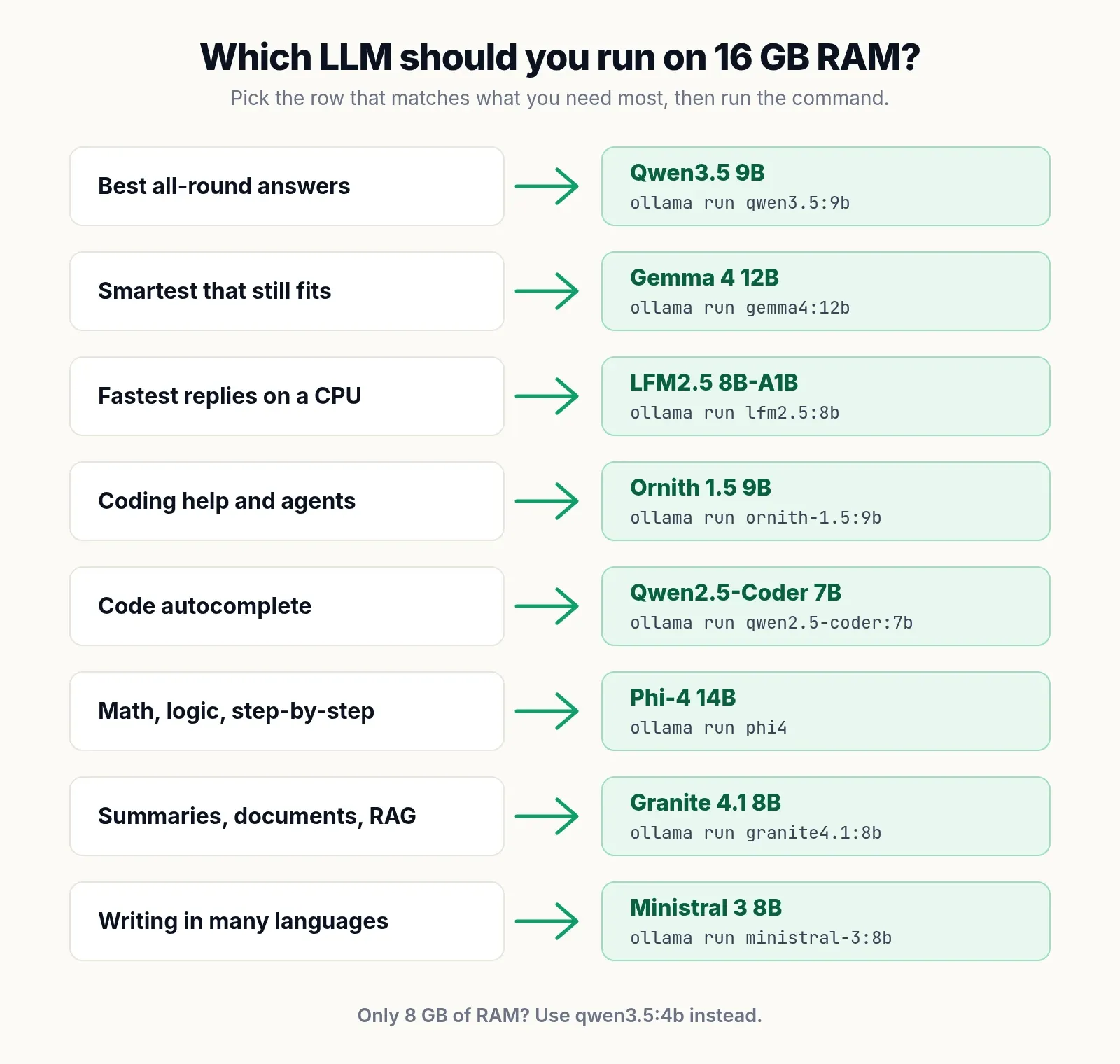
These are the picks, by what you need:
| What you need | Best model | Ollama command | Download |
|---|---|---|---|
| Best all-round answers | Qwen3.5 9B | ollama run qwen3.5:9b |
6.6 GB |
| Smartest that still fits | Gemma 4 12B | ollama run gemma4:12b |
7.7 to 8.0 GB |
| Fastest replies on a CPU | LFM2.5 8B-A1B | ollama run lfm2.5:8b |
5.2 GB |
| Laptops, long chats, images | Gemma 4 E4B | ollama run gemma4:e4b |
6.6 GB |
| Coding help and agents | Ornith 1.5 9B | ollama run ornith-1.5:9b |
6.6 GB |
| Code autocomplete | Qwen2.5-Coder 7B | ollama run qwen2.5-coder:7b |
4.7 GB |
| Math and logic | Phi-4 14B | ollama run phi4 |
9.1 GB |
| Summaries and documents | Granite 4.1 8B | ollama run granite4.1:8b |
5.3 GB |
| Many languages | Ministral 3 8B | ollama run ministral-3:8b |
6.0 GB |
The general rule: on 16 GB of RAM with no GPU, choose a model with 7 to 12 billion parameters in Q4_K_M format, keep the context at 8K to 16K tokens, and keep the download under about 8 GB if you use Windows.
Only have 8 GB? See our guide to the best LLM for 8GB RAM, CPU only. Have 32 GB? See the best local LLM for 32GB RAM.
How much of your 16GB RAM a local LLM can actually use
On Windows 11, a local LLM can use about 10 GB of a 16 GB machine. On Linux with a light desktop, about 12.5 GB. On a 16 GB Apple Silicon Mac, the GPU can use about 11 GB. The rest belongs to the operating system, your browser and, on PCs, the memory reserved for built-in graphics.
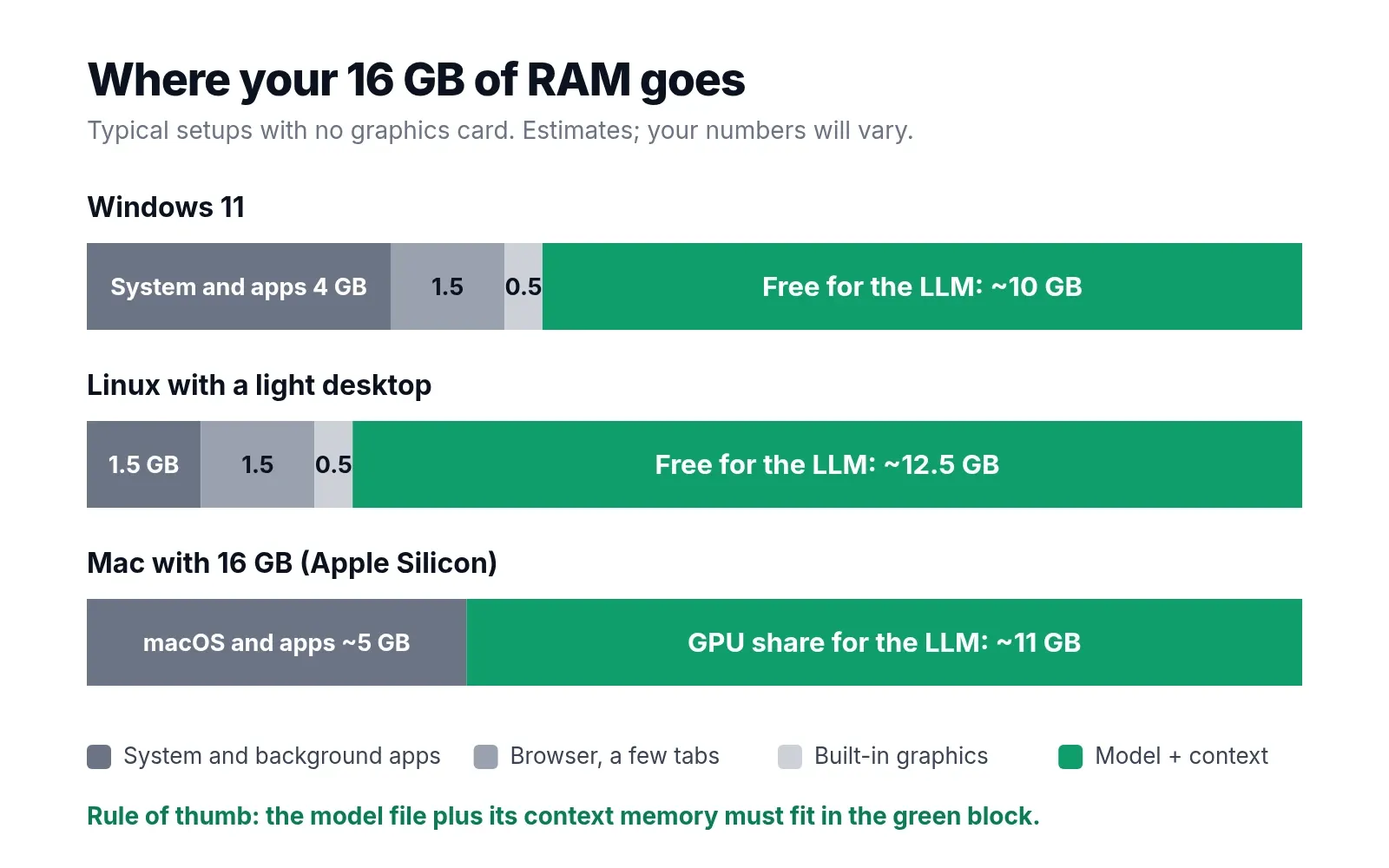
These are typical numbers, not fixed ones:
| Item | Windows 11 | Linux, light desktop |
|---|---|---|
| System and background apps | about 4 GB | about 1.5 GB |
| Browser with a few tabs | about 1.5 GB | about 1.5 GB |
| Reserved for built-in graphics | about 0.5 GB | about 0.5 GB |
| Free for the model and its context | about 10 GB | about 12.5 GB |
To check your own numbers, open Task Manager on Windows, go to Performance, then Memory, and look at “Available”. On Linux, run free -h and read the “available” column. Check with your usual apps open, because that is what the model will share memory with.
Leave about 1.5 GB of that free space unused. The model needs room for its context memory (covered below), and Windows grows its own use when you open more apps. That is why the practical ceiling on Windows is a download of about 8 GB, even though 10 GB is free.
On a 16 GB Mac, the GPU limit is what counts
On an Apple Silicon Mac, the CPU and GPU share one pool of memory, and Ollama runs the model on the GPU. macOS does not let the GPU use all of it: Metal reports a limit called recommendedMaxWorkingSetSize, which on a 16 GB Mac is roughly 10.5 to 12 GB depending on the model and macOS version. That is your real budget, and it is similar to Windows.
You can raise it until the next reboot with sudo sysctl iogpu.wired_limit_mb=12288 (12 GB). Do this only with other apps closed. Starving macOS of memory causes freezes and heavy swapping, which is slower than just choosing the next smaller model.
16GB RAM vs 16GB VRAM: why most lists do not apply to your laptop
Search for “best LLM for 16GB” and most of what you find is written for a graphics card with 16 GB of VRAM, such as an RTX 4060 Ti 16GB or RTX 5060 Ti, usually in a desktop that also has 32 GB of system RAM. Those guides recommend gpt-oss 20B, Qwen3.6 35B-A3B, Gemma 4 26B or Qwen3.8 27B.
On a graphics card, those choices make sense. The card’s memory holds the model and nothing else, and any overflow goes to the separate system RAM.
On a laptop or desktop with 16 GB of RAM and no graphics card, the same 16 GB has to hold the operating system, your apps, the model and its context. The model gets 10 to 12.5 GB at most, so a 14 to 23 GB download does not fit. If your computer has built-in graphics only (Intel Iris Xe, Intel Arc integrated, AMD Radeon integrated), plan as if you were CPU only: built-in graphics share your system RAM and do not add any.
The 10 best local LLMs for 16GB RAM
Each of these runs on a CPU with 16 GB of RAM. They are listed in the order we would recommend them, not by size.
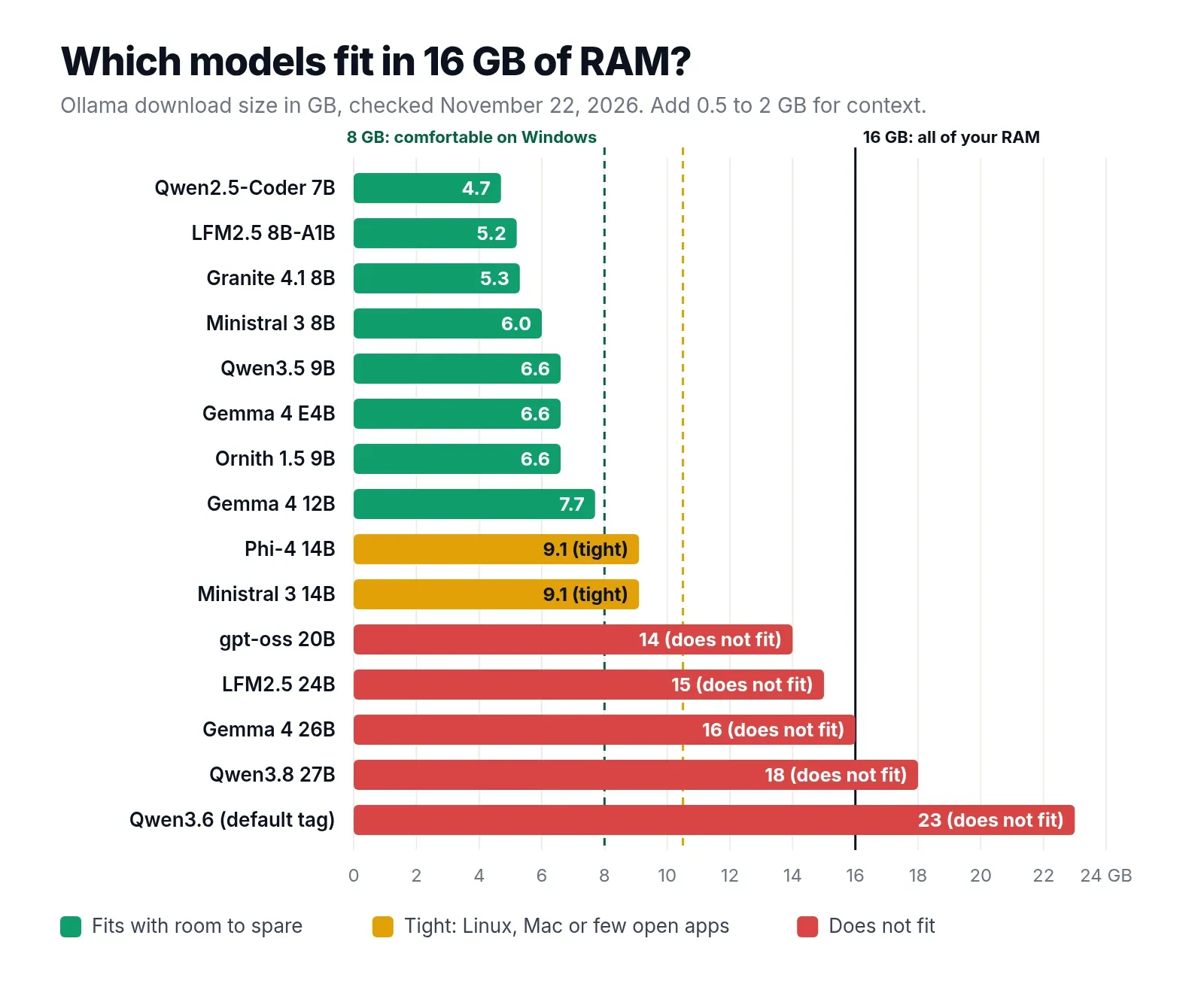
| # | Model | Parameters | Ollama download | Context | License |
|---|---|---|---|---|---|
| 1 | Qwen3.5 9B | 9B | 6.6 GB | 256K | Apache 2.0 |
| 2 | Gemma 4 12B | 12B | 7.7 to 8.0 GB | 256K | Apache 2.0 |
| 3 | LFM2.5 8B-A1B | 8.3B total, 1.5B active | 5.2 GB | 128K | LFM Open License |
| 4 | Gemma 4 E4B | 4.5B effective, 8B total | 6.6 GB | 128K | Apache 2.0 |
| 5 | Ornith 1.5 9B | 9.7B | 6.6 GB | 256K | MIT |
| 6 | Qwen2.5-Coder 7B | 7.6B | 4.7 GB | 32K | Apache 2.0 |
| 7 | Phi-4 | 14.7B | 9.1 GB | 16K | MIT |
| 8 | Granite 4.1 8B | 8B | 5.3 GB | 128K | Apache 2.0 |
| 9 | Ministral 3 8B | 8B | 6.0 GB | 256K | Apache 2.0 |
| 10 | Ministral 3 14B | 14B | 9.1 GB | 256K | Apache 2.0 |
The “Context” column is the most the model supports. On 16 GB of RAM you will use far less, usually 8K to 16K tokens, because every token of context costs memory.
1. Qwen3.5 9B: best overall
Qwen3.5 9B from Alibaba’s Qwen team is the best local LLM for 16GB RAM in late 2026. It is the largest of the Qwen3.5 small models, it is released under Apache 2.0, and it reads images as well as text.
Why it wins at this size:
- It fits with room to spare. At 6.6 GB it leaves about 3.5 GB of headroom on Windows, enough for a long chat and a browser.
- Its context memory is tiny. Only 8 of its 32 layers use full attention; the rest use a linear-attention design with a fixed-size state. A 32K-token conversation costs about 1 GB of extra memory, where a typical 8B model needs 4 to 5 GB.
- It covers 201 languages and handles reasoning, writing and code well for its size.
The catch: it “thinks” before answering by default, which adds hidden tokens and makes simple replies slower on a CPU. For quick questions, run it with --think=false.
On 16 GB, the default tag is the right one: ollama run qwen3.5 downloads the 9B. That was a trap on 8 GB; here it is exactly what you want.
ollama run qwen3.5:9b2. Gemma 4 12B: smartest that still fits
Gemma 4 12B from Google DeepMind is the strongest model that still fits comfortably in 16 GB of RAM. It was released in May 2026 under Apache 2.0, supports a 256K context, and takes text, images and audio as input. Google calls it “Unified” because it handles images and audio without separate encoder models.
Choose it over Qwen3.5 9B when you want more general knowledge and better long-form writing, and you can accept slightly slower replies. Ollama lists this tag as 7.7 to 8.0 GB, because the same tag downloads a slightly different build depending on your hardware; on a PC without an NVIDIA GPU, it is most likely the 8.0 GB Q4_K_M file. That is right at the practical ceiling for Windows, so close heavy apps before long sessions.
Most of its layers use a 1,024-token sliding window, so its context memory grows slowly as well: a long chat stays well under 1 GB of extra memory.
ollama run gemma4:12b3. LFM2.5 8B-A1B: fastest on a CPU
LFM2.5 8B-A1B from Liquid AI is a mixture-of-experts model: it has 8.3 billion parameters in total, but uses only about 1.5 billion for each token it writes. On a CPU, speed depends on how much data has to be read per token, so this model runs roughly four to five times faster than a dense 9B model while needing the memory of an 8B model.
It is built for fast, reliable tool calling and reasoning, with a 128K context and only 6 attention layers out of 24, which keeps its context memory very small. It is weaker than Qwen3.5 9B on general knowledge, so it suits assistants, tool use and quick tasks more than deep questions.
Check the license before using it at work. LFM2.5 is released under the LFM Open License v1.0, which allows free commercial use only for companies with under $10 million in annual revenue. Personal and research use is free.
ollama run lfm2.5:8b4. Gemma 4 E4B: for laptops and long chats
Gemma 4 E4B is the model Micro Center and many others recommend for 16 GB laptops. The “E” stands for effective: it computes like a 4.5B model but stores 8B parameters, most of them per-layer embeddings that are looked up rather than computed. That makes it faster than a true 8B model and better than a true 4B one.
It reads text, images and audio, supports 128K context, and is released under Apache 2.0. It is a good choice when you want quick replies on a laptop with a weaker CPU and do not need the depth of the 9B and 12B models.
On a Mac, check the size after downloading with ollama list. Ollama lists this tag as 6.6 to 9.5 GB, and the upper end matches its larger MLX build for Apple Silicon.
ollama run gemma4:e4b5. Ornith 1.5 9B: best for coding
Ornith 1.5 9B is a coding model released in August 2026 under the MIT license. The Ornith family was built on top of Qwen3.5 and Gemma 4 and then trained with reinforcement learning on coding-agent tasks; this 9B shares Qwen3.5 9B’s architecture. It is the model to use with coding agents and for questions about code, errors and whole files.
It shares Qwen3.5’s small context memory, so you can give it a longer context for code than most models allow on 16 GB. It is covered in more detail in the coding section below.
ollama run ornith-1.5:9b6. Qwen2.5-Coder 7B: code autocomplete
Qwen2.5-Coder 7B is from 2024, which is old for an LLM, but it is still the standard choice for tab autocomplete in an editor. It supports fill-in-the-middle, which means it can complete code in the middle of a file using what comes before and after the cursor. At 4.7 GB it is light enough to run next to your editor and a chat model.
ollama run qwen2.5-coder:7b7. Phi-4: math and logic
Phi-4 from Microsoft is a 14.7B model trained heavily on synthetic reasoning data, and it is strong at math, logic and step-by-step answers. It is MIT licensed.
Two limits: its context is only 16K tokens, and at 9.1 GB it is tight on Windows. Use it on Linux or a 16 GB Mac, or on Windows with the browser closed, and keep the context at 4K to 8K.
ollama run phi48. Granite 4.1 8B: summaries and documents
Granite 4.1 8B from IBM was released in April 2026 under Apache 2.0. It is tuned for business use: summaries, document questions, retrieval-augmented generation (RAG), tool use and structured JSON output, in 12 languages.
It supports a long context, but each token of context costs about 160 KB of memory, so 32K tokens add about 5 GB. On Windows, stay at 8K to 16K. For very long documents, Qwen3.5 9B is more memory-efficient.
ollama run granite4.1:8b9. Ministral 3 8B: many languages
Ministral 3 8B from Mistral AI handles dozens of languages well, reads images, follows system prompts closely and supports function calling. It is Apache 2.0 licensed and a 6.0 GB download. Mistral recommends a temperature below 0.1 for everyday use.
ollama run ministral-3:8b10. Ministral 3 14B: the step up
Ministral 3 14B has the same strengths with more knowledge. At 9.1 GB it is in the same “tight” group as Phi-4: fine on Linux or a 16 GB Mac with a short context, risky on Windows with a browser open.
ollama run ministral-3:14bModels that will not fit in 16GB RAM (and the Ollama tag traps)
These models appear in many “16GB” guides, but with 16 GB of system RAM and no GPU they do not fit or they swap:
| Model | Ollama download | Why it fails on 16 GB RAM |
|---|---|---|
| gpt-oss 20B | 14 GB | Bigger than the free RAM on Windows and Linux, and the GPU share on a Mac |
LFM2.5 24B-A2B (lfm2.5:24b) |
15 GB | Same |
Gemma 4 26B (gemma4:26b) |
16 GB | All of your RAM, before the operating system |
| Qwen3.8 27B | 18 GB | More than all of your RAM |
Qwen3.6 (qwen3.6 default tag) |
23 GB | The default tag is the 35B model |
| Mistral Small 3.2 or Devstral Small 2 (24B) | 15 GB | Too big |
The gpt-oss trap. OpenAI says gpt-oss 20B runs on systems with as little as 16 GB of memory. That is true for a 16 GB graphics card or a machine with almost nothing else loaded. On a 16 GB laptop with Windows and a browser, the 14 GB model swaps to disk and generates well under one token per second.
The tag trap. In Ollama, a model name with no tag downloads the “latest” tag, and for some families that is a model too big for 16 GB. ollama run qwen3.6 downloads 23 GB. Always type the size tag: qwen3.5:9b, gemma4:12b, lfm2.5:8b.
Squeezed 27B models. You can find 27B models quantized to 2 or 3 bits that load in about 10 GB. Heavy quantization damages quality badly, and a good 9B to 12B model at Q4_K_M usually gives better answers.
How fast is a 9B model on 16GB RAM, CPU only?
On a CPU, a 9B model writes roughly 5 to 6 tokens per second on a typical laptop with two RAM sticks, and up to about 11 on a newer DDR5 machine. A token is about three quarters of a word, so 5 tokens per second is close to normal reading speed.
To produce each token, the CPU has to read the model’s active weights from RAM once. So the top speed is roughly memory bandwidth divided by the size read per token. A faster CPU helps a little; faster RAM helps a lot.
The estimates below use that formula, then take 50 to 70 percent of the result, because real software never reaches the theoretical limit. They are estimates, not benchmarks:
| Size read per token | One stick DDR4-3200 (25.6 GB/s) | Two sticks DDR4-3200 (51.2 GB/s) | Two sticks DDR5-5600 (89.6 GB/s) |
|---|---|---|---|
| ~1 GB (LFM2.5 8B-A1B) | 13 to 18 tok/s | 26 to 36 tok/s | 45 to 63 tok/s |
| ~3 GB (Gemma 4 E4B) | 4 to 6 tok/s | 9 to 12 tok/s | 15 to 21 tok/s |
| ~5.5 GB (Qwen3.5 9B, Ornith 1.5 9B) | 2 to 3 tok/s | 5 to 6.5 tok/s | 8 to 11 tok/s |
| ~7 GB (Gemma 4 12B) | 2 to 2.5 tok/s | 3.5 to 5 tok/s | 6.5 to 9 tok/s |
| ~9 GB (Phi-4, Ministral 3 14B) | 1.5 to 2 tok/s | 3 to 4 tok/s | 5 to 7 tok/s |
The LFM2.5 row assumes memory speed is the limit. With only 1.5B active parameters, a slower CPU can become the bottleneck first, so treat that row as a ceiling.
Three things follow from this table:
- Mixture-of-experts models are the CPU user’s best friend. LFM2.5 8B-A1B needs the memory of an 8B model but runs like a 1.5B one.
- One RAM stick halves your speed. A laptop with a single 16 GB stick runs in single channel mode. To check, open Task Manager, Performance, Memory, and look at “Slots used”. “1 of 2” means single channel, and adding a matching stick nearly doubles speed.
- Prompt reading is slow on a CPU. Before answering, the model reads your whole prompt. A short question is instant; a pasted 3,000-word document can take a minute on a laptop CPU.
To see your own numbers, run a model with --verbose. After each reply, Ollama prints the “eval rate”, which is your generation speed in tokens per second:
ollama run qwen3.5:9b --verboseOn a 16 GB Mac
Macs run the model on the GPU and have faster memory than most PCs, so the same models run faster. Using the same method, a 9B model at about 5.5 GB per token gives roughly 6 to 9 tokens per second on an M1 (68 GB/s), 9 to 13 on an M2 or M3 (100 GB/s), and 11 to 15 on an M4 (120 GB/s). Newer chips with more bandwidth are faster again.
Best local LLM for coding with 16GB RAM
For coding on 16 GB of RAM, use two models: Ornith 1.5 9B for chat and agents, and Qwen2.5-Coder 7B for autocomplete. Together they are 11.3 GB, so load only one at a time unless you are on Linux.
| Task | Model | Why |
|---|---|---|
| Explaining errors, writing functions, reviewing a file | Ornith 1.5 9B | Trained for coding agents; small context memory |
| Coding agents and tool calls | Ornith 1.5 9B or LFM2.5 8B-A1B | LFM2.5 is faster for simple tool loops |
| Tab autocomplete in an editor | Qwen2.5-Coder 7B | Fill-in-the-middle support, light and fast |
| General questions while coding | Qwen3.5 9B | Best all-round knowledge |
What to expect: a 9B model on 16 GB helps with single files, functions, tests, regular expressions, SQL and error messages. It does not replace a frontier cloud model for refactoring a whole project, and on a CPU a coding agent that runs many steps will be slow. For agents, keep tasks small and give the model the files it needs instead of the whole repository.
Most editor extensions that support local models, such as Continue for VS Code and JetBrains, can talk to Ollama directly. Point the chat setting at ornith-1.5:9b and the autocomplete setting at qwen2.5-coder:7b.
Best LLM for Mac Mini M4 16GB and MacBook Air 16GB
The best LLM for a Mac Mini M4 with 16 GB, or a MacBook Air M4 or M5 with 16 GB, is the same as for PCs: Qwen3.5 9B first and Gemma 4 12B for more knowledge. Both fit inside the roughly 11 GB the GPU can use, and both run faster than on most PCs.
Mac-specific advice:
- Stay at 12B and below. 14B models at 9.1 GB fit only with a short context and few apps open.
- Check sizes after download. For some tags, Ollama serves a larger MLX build on Apple Silicon. Run
ollama listto see what you actually got. - Close memory-hungry apps. Browsers, Xcode and video editors compete for the same unified memory as the GPU.
- LM Studio with MLX models is a good alternative to Ollama on a Mac. Choose a 4-bit MLX download of the same models.
Best Ollama model for 16GB RAM: setup in 5 minutes
The best Ollama model for 16GB RAM is qwen3.5:9b, and Ollama is the easiest way to run it.
On Windows
- Download the Windows installer from ollama.com and run it. No account is needed.
- Open PowerShell or Command Prompt.
- Run your first model:
ollama run qwen3.5:9b- The first run downloads the model (6.6 GB). After that it starts in a few seconds, and you can type questions directly.
- Type
/byeto exit.
Ollama on Windows also has a simple chat window if you prefer a normal app to the terminal.
On Linux
curl -fsSL https://ollama.com/install.sh | sh
ollama run qwen3.5:9b
The install script sets Ollama up as a background service. A light desktop such as Xfce or LXQt leaves more RAM for the model than GNOME or KDE.
On a Mac
Download Ollama for macOS from ollama.com and run the same command. On Apple Silicon, the GPU is used automatically.
Useful Ollama commands
| Command | What it does |
|---|---|
ollama list |
Shows downloaded models and their sizes |
ollama ps |
Shows loaded models, memory used and whether they run on CPU or GPU |
ollama rm qwen3.6 |
Deletes a model you downloaded by mistake |
ollama stop qwen3.5:9b |
Unloads a model from RAM right away |
/set parameter num_ctx 16384 |
Inside a chat: sets the context length to 16K |
LM Studio on 16 GB
LM Studio’s own documentation recommends 16 GB of RAM, so this is the setup it is designed for. On Windows and Linux it needs a CPU with AVX2 support. Choose the Q4_K_M download of each model, trust its “likely too large” warning, keep GPU offload at 0 if you have no graphics card, and set the context length to 8K to 16K rather than the maximum.
7B, 9B or 14B? Choosing a model size for 16GB
At Q4_K_M, a model needs about 0.6 GB per billion parameters, plus room for context. That gives a simple size guide for 16 GB:
| Model size | Q4_K_M download | On 16 GB RAM |
|---|---|---|
| 7B to 9B | 4.5 to 6.6 GB | Comfortable everywhere, room for long chats |
| 12B | about 7.7 to 8 GB | Comfortable on Linux and Mac, at the ceiling on Windows |
| 14B | about 9 GB | Tight: Linux or Mac, short context |
| 20B and up | 12 GB and more | Does not fit |
Two common questions:
- Should I run a 9B model at Q8 instead of Q4 for better quality? Usually not. Q8 roughly doubles the size to about 10 GB and halves the speed for a small gain. A 12B at Q4_K_M is usually the better use of that memory.
- Is a 14B at Q3 better than a 9B at Q4? Sometimes, but it is close, and the 14B will be slower. A newer 9B to 12B at Q4_K_M is the safer choice.
For what Q4_K_M, Q5_K_M, Q8_0 and the other GGUF formats mean, see what is Q4_K_M?
Context length on 16GB: how much room is left
Context is how much text the model keeps in mind at once: your messages, its replies and any document you paste. Every token of context is stored in memory, in the KV cache. On 16 GB it matters less than on 8 GB, but it still decides whether a 12B or 14B model fits.
These are our calculations from each model’s published configuration, at the default 16-bit cache:
| Model | Per token | 8K context | 32K context |
|---|---|---|---|
| Qwen3.5 9B, Ornith 1.5 9B | 32 KB | about 256 MB | about 1 GB |
| LFM2.5 8B-A1B | 12 KB | about 96 MB | about 384 MB |
| Qwen2.5-Coder 7B | 56 KB | about 450 MB | about 1.8 GB |
| Ministral 3 8B | 136 KB | about 1.1 GB | about 4.3 GB |
| Granite 4.1 8B, Ministral 3 14B | 160 KB | about 1.3 GB | about 5 GB |
| Phi-4 | 200 KB | about 1.6 GB | not supported (16K max) |
Gemma 4 models are not in the table because most of their layers use a short sliding window, which caps much of the cache at a fixed size. In practice their context memory also stays small.
Practical rule: use 8K to 16K context on 16 GB. With Qwen3.5 9B or LFM2.5 you can go to 32K and beyond. To set it in Ollama, type /set parameter num_ctx 16384 in a chat, or start the server with the OLLAMA_CONTEXT_LENGTH=16384 environment variable.
Which model should you pick?
If you are still unsure, install Ollama and try two models with the same three questions from your real work:
ollama run qwen3.5:9b
ollama run gemma4:12b
Ten minutes of side-by-side testing on your own tasks tells you more than any benchmark. Delete the one you do not like with ollama rm.
How we picked these models
PickZeal did not run lab benchmarks for this guide, and we say so up front. Instead, every model here was checked against public, verifiable sources on November 22, 2026:
- Sizes come from the Ollama library tag pages for each model.
- Parameter counts, licenses and release dates come from each model’s Hugging Face page.
- Context memory figures are our own calculations from each model’s published configuration (attention layers, key-value heads and head size), at a 16-bit cache.
- Speeds are estimates: memory bandwidth divided by the size read per token, reduced to 50 to 70 percent of that ceiling to reflect real software. Your results will vary with CPU, RAM speed, background apps and power settings.
- Picks favor models that leave headroom on a Windows 11 computer with a browser open, because that is the most common 16 GB setup.
We will update this guide when new models come out or download sizes change. The “Updated” date at the top shows when it was last checked.
Frequently asked questions
Is 16GB RAM enough for a local LLM?
Yes. 16 GB of RAM runs 7B to 12B models comfortably at Q4_K_M, such as Qwen3.5 9B, Gemma 4 12B and Ministral 3 8B, with room for Windows and a browser. 14B models fit on Linux or a Mac with a short context. Models of 20B and up, such as gpt-oss 20B, do not fit.
How much RAM do I need for a local LLM?
At Q4_K_M a model needs about 0.6 GB per billion parameters, plus 0.5 to 2 GB for context, plus whatever your operating system and apps use. In practice: 8 GB of RAM for 3B to 4B models, 16 GB for 7B to 12B models, and 32 GB for 14B to 30B models.
Can 16GB RAM run a 14B model?
Barely. A 14B model such as Phi-4 or Ministral 3 14B is a 9.1 GB download. It fits on a light Linux desktop or a 16 GB Mac with a 4K to 8K context, but on Windows with a browser open it leaves almost no headroom and often swaps. A 9B to 12B model is the safer choice.
Can I run gpt-oss-20b on 16GB RAM?
Not well. gpt-oss 20B is a 14 GB download in Ollama. OpenAI says it runs on systems with 16 GB of memory, but that means 16 GB of GPU or unified memory with little else loaded. On a 16 GB PC with Windows and a browser, only about 10 GB is free, so it swaps to disk and slows to a crawl.
Can 16GB run a 27B model?
Not at normal quality. A 27B model at Q4_K_M is 17 to 18 GB, more than all of your RAM. Squeezed to 2 or 3 bits it can load, but quality drops sharply. A good 9B to 12B model at Q4_K_M gives better answers on 16 GB.
What is the best Ollama model for 16GB RAM?
qwen3.5:9b is the best all-round Ollama model for 16 GB of RAM. It is a 6.6 GB download, reads images as well as text, supports 201 languages and leaves enough memory for the operating system. For more knowledge use gemma4:12b (7.7 to 8.0 GB); for speed on a CPU use lfm2.5:8b (5.2 GB).
What is the best local LLM for coding with 16GB RAM?
Ornith 1.5 9B is the best local coding model for 16 GB of RAM in late 2026. It is trained for coding agents, is MIT licensed and is a 6.6 GB download. For tab autocomplete inside an editor, Qwen2.5-Coder 7B (4.7 GB) is faster and supports fill-in-the-middle.
Is 16 GB RAM enough for AI development?
For learning, prototyping and building apps against a local model, yes. You can run a 7B to 12B model, an embedding model and your code at the same time. Fine-tuning models, running 30B-class models or training from scratch needs a GPU with its own memory or a much larger machine.
Sources
- Ollama library: qwen3.5 tags
- Ollama library: gemma4 tags
- Ollama library: lfm2.5 tags
- Ollama library: ornith-1.5 tags
- Ollama library: gpt-oss
- Hugging Face: Qwen/Qwen3.5-9B model card
- Hugging Face: google/gemma-4-12B-it model card
- Hugging Face: google/gemma-4-E4B-it model card
- Hugging Face: LiquidAI/LFM2.5-8B-A1B model card
- Hugging Face: ornith-ai/Ornith-1.5-9B model card
- Hugging Face: microsoft/phi-4 model card
- Hugging Face: ibm-granite/granite-4.1-8b model card
- Hugging Face: mistralai/Ministral-3-8B-Instruct-2512 model card
- Hugging Face: Qwen/Qwen2.5-Coder-7B-Instruct model card
- Liquid AI: LFM Open License
- LM Studio: system requirements
Topic
More on Local LLMs
- GuideBest Local LLM for 32GB RAM: 10 Models That Fit (2026)The best local LLMs for 32GB RAM and no GPU: 10 models that fit, real Ollama sizes, and why mixture-of-experts models run 5 to 10 times faster on a CPU.
- GuideWhat Is Q4_K_M? GGUF Quantization Explained (2026)What Q4_K_M means in a GGUF file, how it compares with Q4_K_S, Q5_K_M, Q6_K, Q8_0, IQ4_XS and UD-Q4_K_XL, and which quantization to download for your RAM.
- GuideBest LLM for 8GB RAM, CPU Only: 9 Open Source Picks (2026)The best open source LLMs for 8GB RAM and no GPU: 9 models that fit, real download sizes, speed estimates and Ollama setup for Windows, Mac and Linux.