
- Local LLMs
- Local AI
- LLMs
- Ollama
- Guides
Best Local LLM for 32GB RAM: 10 Models That Fit (2026)
The best local LLMs for 32GB RAM and no GPU: 10 models that fit, real Ollama sizes, and why mixture-of-experts models run 5 to 10 times faster on a CPU.
By PickZeal
Updated 17 min read
Key takeaways
- The best local LLM for 32GB RAM on a CPU is Gemma 4 26B A4B. Run it with: ollama run gemma4:26b-a4b-it-qat (16 GB download).
- On 32 GB, choose mixture-of-experts (MoE) models. They use only 2.5B to 4B of their parameters per token, so on a CPU they run about 5 to 10 times faster than a dense model of the same size.
- Qwen3.8 27B is the smartest model that fits, but it is dense: expect about 2 to 4 tokens per second on a CPU. It shines on a Mac or if you can wait.
- On Windows about 24 GB of your 32 GB is free for the model, so keep downloads under about 20 GB. Linux leaves about 28 GB; a 32 GB Mac gives the GPU about 22 GB.
- 70B models do not fit. Llama 3.3 70B is 43 GB, and squeezing it to 2 bits costs more quality than you gain.
The best local LLM for 32GB RAM on a computer without a graphics card is Gemma 4 26B A4B. It is a 16 GB download in Ollama, it is released under Apache 2.0, and because it is a mixture-of-experts model it uses only 3.8 billion of its 25 billion parameters for each token, so it runs quickly on a CPU. If you want the smartest answers and can accept slow replies, or you have a Mac, choose Qwen3.8 27B. For coding agents, choose GLM-4.7-Flash.
This guide covers ten open models that fit in 32 GB of system RAM, and on 32 GB Macs. For each one you get the download size, the license, what it is good at and the exact command to run it. It also explains the one thing that matters most at this size and that most “best LLM for 32GB” lists skip: the difference between dense and mixture-of-experts models, which decides whether a model writes 3 words per second on your CPU or 25.
All sizes were checked on the Ollama library and Hugging Face on November 22, 2026. Speeds are labeled estimates, worked out from memory bandwidth, not lab benchmarks. If you are new to this, start with our guide on how to run an LLM locally.
The short answer: best LLM for 32GB RAM
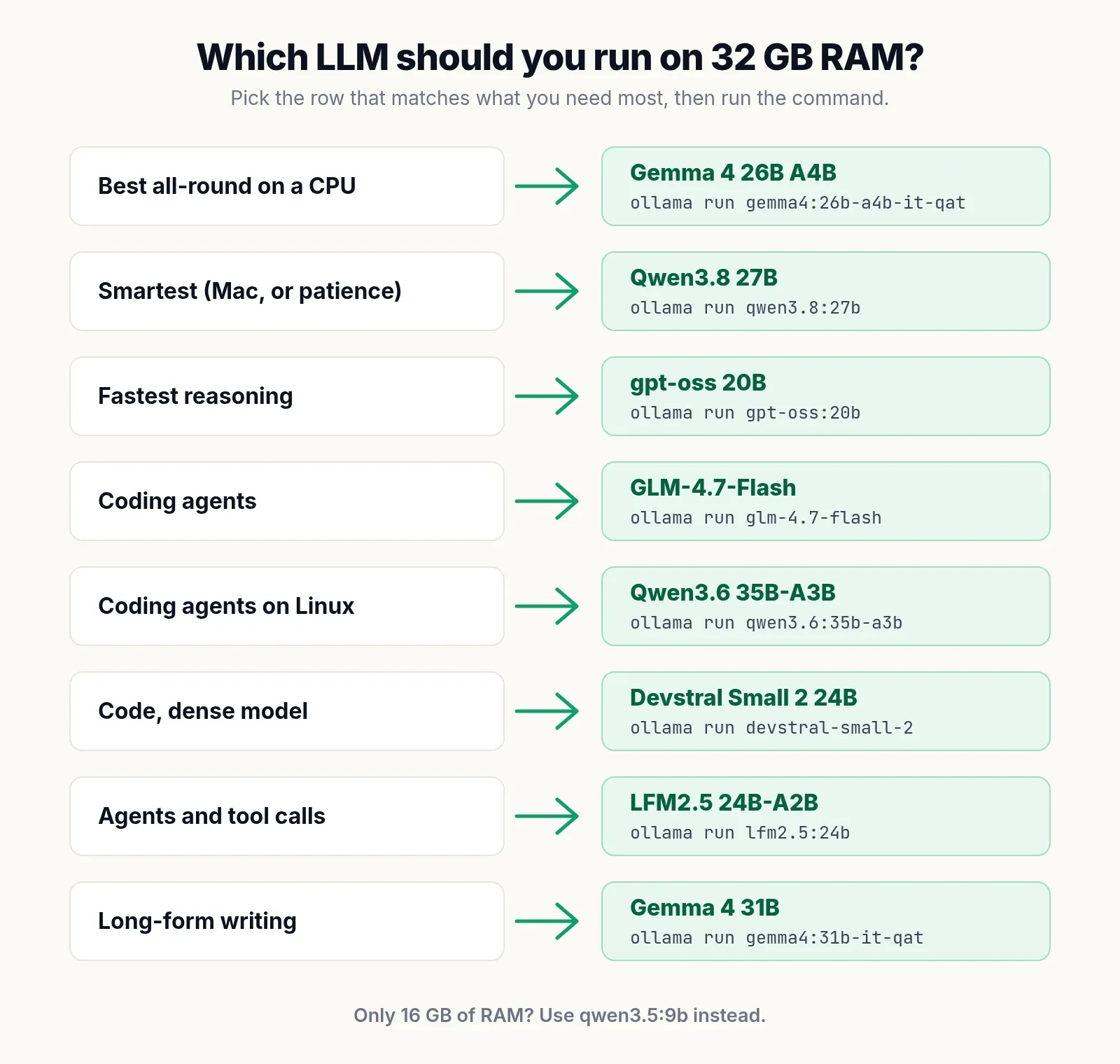
These are the picks, by what you need:
| What you need | Best model | Ollama command | Download |
|---|---|---|---|
| Best all-round on a CPU | Gemma 4 26B A4B | ollama run gemma4:26b-a4b-it-qat |
16 GB |
| Smartest answers (Mac, or patience) | Qwen3.8 27B | ollama run qwen3.8:27b |
18 GB |
| Fastest reasoning | gpt-oss 20B | ollama run gpt-oss:20b |
14 GB |
| Coding agents | GLM-4.7-Flash | ollama run glm-4.7-flash |
19 GB |
| Coding agents on Linux | Qwen3.6 35B-A3B | ollama run qwen3.6:35b-a3b |
23 GB |
| Code, dense model | Devstral Small 2 24B | ollama run devstral-small-2 |
15 GB |
| Agents and tool calls | LFM2.5 24B-A2B | ollama run lfm2.5:24b |
15 GB |
| Long-form writing | Gemma 4 31B | ollama run gemma4:31b-it-qat |
19 GB |
| Documents and RAG | Granite 4.1 30B | ollama run granite4.1:30b |
17 GB |
The general rule: on 32 GB of RAM with no GPU, choose a mixture-of-experts model of 20B to 35B parameters in a 4-bit format, keep the download under about 20 GB on Windows, and use 16K to 32K of context.
Have less memory? See our guides to the best local LLM for 16GB RAM and the best LLM for 8GB RAM.
How much of your 32GB RAM a local LLM can actually use
On Windows 11, a local LLM can use about 24 GB of a 32 GB machine. On Linux with a light desktop, about 28 GB. On a 32 GB Apple Silicon Mac, the GPU can use about 22 GB.
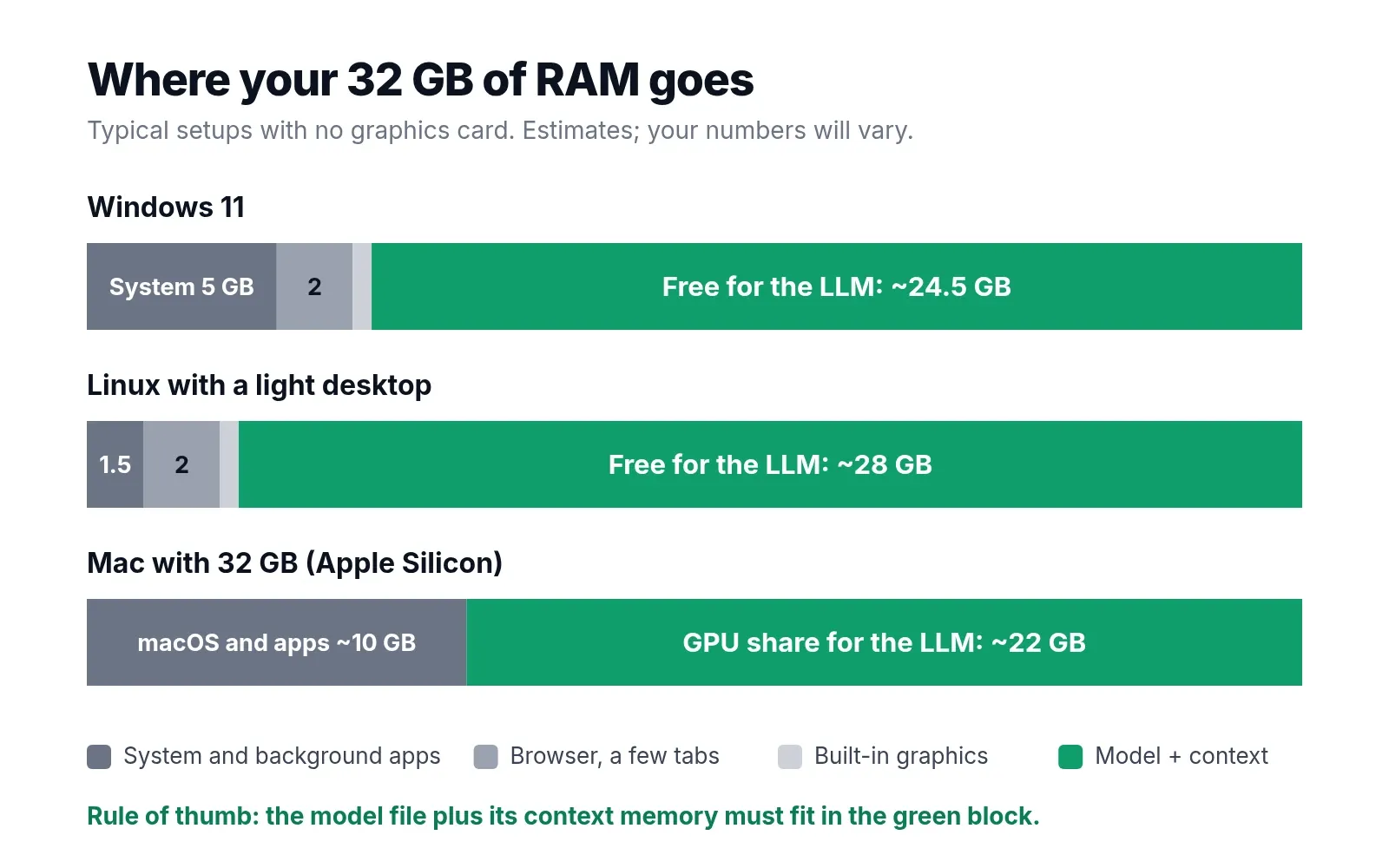
These are typical numbers, not fixed ones:
| Item | Windows 11 | Linux, light desktop |
|---|---|---|
| System and background apps | about 5 GB | about 1.5 GB |
| Browser with a few tabs | about 2 GB | about 2 GB |
| Reserved for built-in graphics | about 0.5 GB | about 0.5 GB |
| Free for the model and its context | about 24.5 GB | about 28 GB |
On Windows, open Task Manager, go to Performance, then Memory, and read “Available” with your usual apps open. On Linux, run free -h.
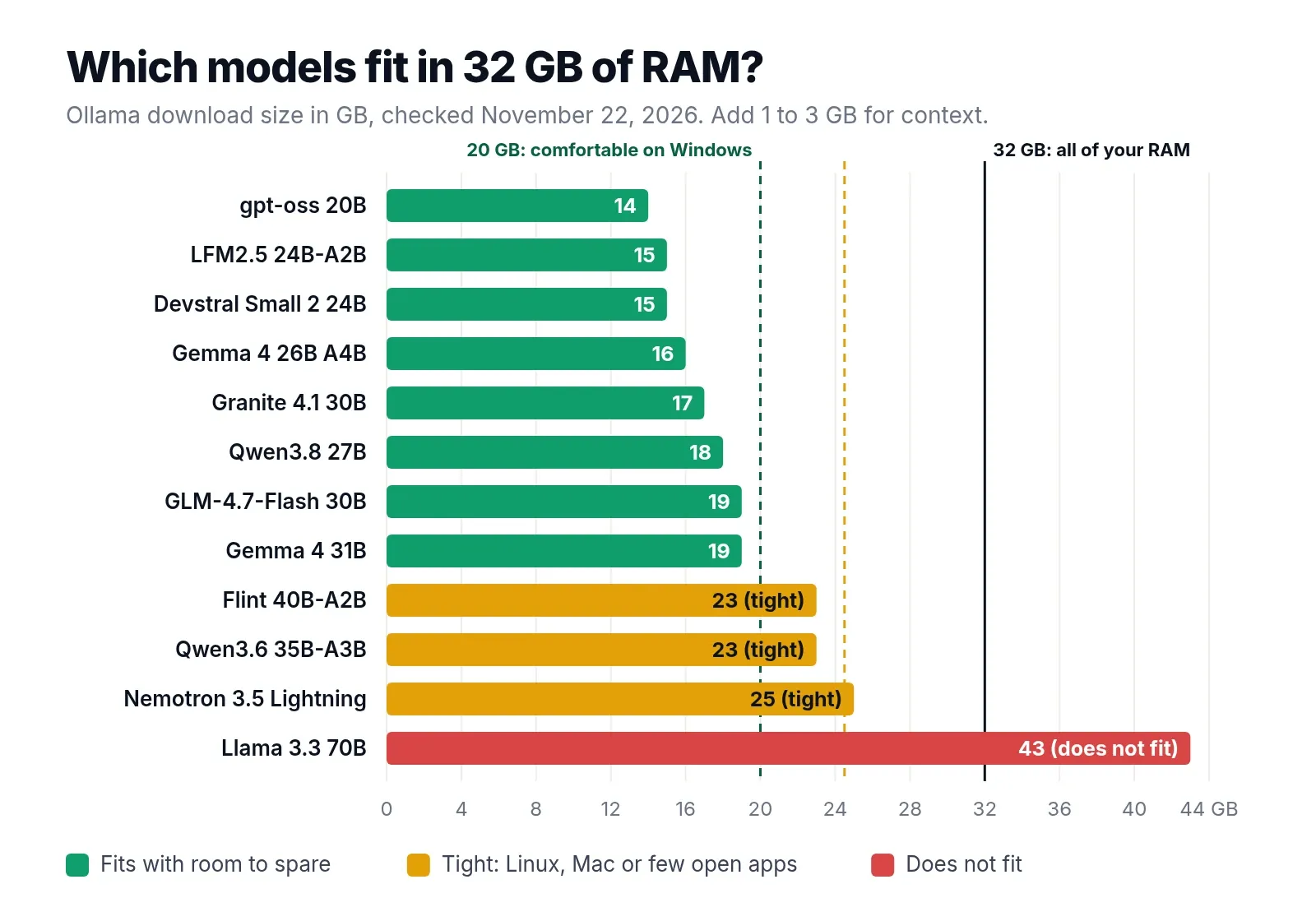
Leave 3 to 4 GB of that free space for context and for the apps you open later. That is why the practical ceiling on Windows is a download of about 20 GB, and why the 23 to 25 GB models below are marked as Linux-only.
On a 32 GB Mac, macOS lets the GPU use roughly two thirds to three quarters of memory, which is about 21 to 24 GB. You can raise the limit until the next reboot with sudo sysctl iogpu.wired_limit_mb=26624 (26 GB), with other apps closed.
Dense vs mixture-of-experts: why it matters on 32GB
This is the most important idea in this guide.
A dense model uses all of its parameters for every token it writes. Qwen3.8 27B reads about 17 GB of weights from memory for each token.
A mixture-of-experts (MoE) model is split into many small “experts”, and a router picks a few of them for each token. Gemma 4 26B A4B has 25 billion parameters in total but uses only about 3.8 billion per token. The “A4B” in the name means about 4B active. Qwen3.6 35B-A3B uses about 3B, and gpt-oss 20B about 3.6B.
Both kinds need enough memory to hold the whole model. But on a CPU, speed depends on how many bytes are read per token, and an MoE model reads only its active experts. So:
- Memory needed: set by the total size. A 30B MoE needs about as much RAM as a 30B dense model.
- Speed: set by the active size. A 30B MoE with 3B active runs roughly like a 3B dense model.
On a graphics card with fast memory, dense models are fast enough either way. On a CPU with normal RAM, MoE is the difference between usable and painful. That is why our top pick for CPUs is an MoE model, even though most “32GB” lists, written for GPUs, pick the dense Qwen3.8 27B.
The 10 best local LLMs for 32GB RAM
They are listed in the order we would recommend them for a computer without a graphics card.
| # | Model | Type | Total / active | Ollama download | Context | License |
|---|---|---|---|---|---|---|
| 1 | Gemma 4 26B A4B | MoE | 25.2B / 3.8B | 16 GB (QAT) | 256K | Apache 2.0 |
| 2 | Qwen3.8 27B | Dense | 27B | 18 GB | 256K | Apache 2.0 |
| 3 | gpt-oss 20B | MoE | 21B / 3.6B | 14 GB | 128K | Apache 2.0 |
| 4 | GLM-4.7-Flash | MoE | 30B / 3B | 19 GB | 198K | MIT |
| 5 | Qwen3.6 35B-A3B | MoE | 35B / 3B | 23 GB | 256K | Apache 2.0 |
| 6 | Flint 40B-A2B | MoE | 39.8B / 2.5B | 23 GB | 256K | Apache 2.0 |
| 7 | Devstral Small 2 | Dense | 24B | 15 GB | 384K | Apache 2.0 |
| 8 | LFM2.5 24B-A2B | MoE | 24B / 2B | 15 GB | 128K | LFM Open License |
| 9 | Gemma 4 31B | Dense | 30.7B | 19 GB (QAT) | 256K | Apache 2.0 |
| 10 | Granite 4.1 30B | Dense | 30B | 17 GB | 128K | Apache 2.0 |
1. Gemma 4 26B A4B: best overall on a CPU
Gemma 4 26B A4B from Google DeepMind is the best local LLM for 32GB RAM without a graphics card. It has 25.2 billion parameters spread over 128 experts, uses about 3.8 billion per token, supports a 256K context, reads images as well as text, and is released under Apache 2.0.
Use the QAT build. Google trained it to work well at 4 bits, it is the smallest version at 16 GB, and it leaves 8 GB of headroom on Windows. Most of its layers use a 1,024-token sliding window, so even a long context adds little memory.
ollama run gemma4:26b-a4b-it-qat2. Qwen3.8 27B: smartest that fits
Qwen3.8 27B from Alibaba’s Qwen team, released in August 2026 under Apache 2.0, is the model most “32GB” guides recommend, and for quality they are right. It is strong at coding, research and long agent tasks, reads images and video, and thinks before answering by default.
The catch is speed. It is dense, so a CPU has to read about 17 GB for every token. On a typical desktop with DDR5 that is roughly 3 tokens per second. That is fine for questions you can wait for, and much better on a Mac. For quick replies, turn thinking off with --think=false.
ollama run qwen3.8:27b3. gpt-oss 20B: fastest reasoning
gpt-oss 20B is OpenAI’s open-weight model, released under Apache 2.0. It has about 21 billion parameters, uses about 3.6 billion per token, and ships in the MXFP4 format it was trained for, so the 14 GB download is the native model, not a compressed copy.
It is strong at step-by-step reasoning and tool calling, and you can set its reasoning effort to low, medium or high. On 16 GB it was too big; on 32 GB it fits with 10 GB to spare.
ollama run gpt-oss:20b4. GLM-4.7-Flash: coding agents on Windows
GLM-4.7-Flash from Z.ai is a 30B MoE with about 3B active parameters, released in January 2026 under the MIT license. Its makers report 59.2% on SWE-bench Verified, against 34.0% for gpt-oss 20B, which makes it the strongest coding-agent model that fits comfortably on 32 GB with Windows. It uses compressed (MLA) attention, which keeps its context memory small.
ollama run glm-4.7-flash5. Qwen3.6 35B-A3B: coding agents on Linux
Qwen3.6 35B-A3B, released in April 2026, is the favorite of people running local coding agents on 16 GB graphics cards. It has 256 experts with 8 used per token, about 3B active, and the same hybrid attention as Qwen3.5, so its context memory is tiny.
At 23 GB (24 GB for the Q4_K_M tag) it is too tight for Windows with a browser open, but fine on Linux. Note that plain ollama run qwen3.6 downloads this model, not the 27B.
ollama run qwen3.6:35b-a3b6. Flint 40B-A2B: the newest coding agent
Flint from Recursive, released in October 2026 under Apache 2.0, is a 39.8B MoE that uses only about 2.5 billion parameters per token, which makes it one of the fastest large models on a CPU. Recursive reports 74.2% on SWE-bench Verified. It is built for multi-step coding tasks: investigating bugs, implementing features and writing tests. Like Qwen3.6, at 23 GB it belongs on Linux.
ollama run flint7. Devstral Small 2: best dense coding model
Devstral Small 2 from Mistral AI, released in December 2025 under Apache 2.0, is a 24B dense model for coding agents: exploring codebases, editing several files and using tools. At 15 GB it fits easily, but as a dense model it is slow on a CPU, about 3 to 4 tokens per second with DDR5. Its context memory is also large: about 160 KB per token, so 32K tokens add about 5 GB.
ollama run devstral-small-28. LFM2.5 24B-A2B: agents and tool calls
LFM2.5 24B-A2B from Liquid AI uses only about 2 billion of its 24 billion parameters per token, always reasons before answering, and was trained inside popular agent harnesses. Liquid AI reports it ahead of Qwen3.6 35B-A3B on its LiveClaw agent benchmark. At 15 GB it leaves plenty of room. Check the license before using it at work: it is free for commercial use only for companies under $10 million in annual revenue.
ollama run lfm2.5:24b9. Gemma 4 31B: long-form writing
Gemma 4 31B is the dense big sibling of our top pick, with 30.7 billion parameters. It gives more polished long-form writing and deeper answers than the 26B A4B, at a dense model’s speed. Use the 19 GB QAT build.
ollama run gemma4:31b-it-qat10. Granite 4.1 30B: documents and RAG
Granite 4.1 30B from IBM, released in April 2026 under Apache 2.0, is tuned for business documents, retrieval-augmented generation, tool use and structured JSON output, in 12 languages. It is dense and slow on a CPU, so it suits batch work such as summarizing a folder of documents overnight more than live chat.
ollama run granite4.1:30bKeep a small model too
Even with 32 GB, a fast small model is useful for quick questions and autocomplete. Qwen3.5 9B (6.6 GB) or Qwen2.5-Coder 7B (4.7 GB) can sit next to any of the MoE models above on Linux, or replace them for quick tasks on Windows. See our 16GB guide for those.
Models that will not fit in 32GB RAM
| Model | Ollama download | Why it fails on 32 GB RAM |
|---|---|---|
| Nemotron 3.5 Lightning 30B-A3B | 19 to 25 GB | The tag resolves to different builds; the Q4_K_M file is 25 GB, too big for Windows |
| Llama 3.3 70B | 43 GB | More than all of your RAM |
| Qwen3-Coder-Next 80B-A3B | 52 GB | Far too big, despite only 3B active |
| gpt-oss 120B | 65 GB | Far too big |
| Qwen3.5 122B | 81 GB | Far too big |
The size-range trap. For some models, Ollama’s tag page shows a range, such as “19GB - 25GB” for nemotron-3.5-lightning. The same tag can download a different build depending on your hardware. If you have no NVIDIA GPU and no Mac, assume the larger Q4_K_M size, or type the exact tag, such as nemotron-3.5-lightning:30b-a3b-q4_K_M, so you know what you get.
70B at 2 bits. You can find Llama 3.3 70B squeezed to 2 bits at around 26 GB. It barely loads on Linux, a dense 70B on a CPU writes well under one token per second, and 2-bit quantization damages quality badly. A 27B to 35B model at 4 bits is better on every count. See our guide to what Q4_K_M means for why bits matter.
How fast is a 30B model on 32GB RAM, CPU only?
It depends almost entirely on whether the model is dense or MoE. The estimates below use memory bandwidth divided by the bytes read per token, then take 50 to 70 percent of that, because real software never reaches the theoretical limit:
| Size read per token | Two sticks DDR4-3200 (51.2 GB/s) | Two sticks DDR5-5600 (89.6 GB/s) |
|---|---|---|
| ~1.5 GB (Flint 40B-A2B, LFM2.5 24B-A2B) | 17 to 24 tok/s | 30 to 42 tok/s |
| ~2 GB (gpt-oss 20B, GLM-4.7-Flash, Qwen3.6 35B-A3B) | 13 to 18 tok/s | 22 to 31 tok/s |
| ~2.5 GB (Gemma 4 26B A4B) | 10 to 14 tok/s | 18 to 25 tok/s |
| ~15 GB (Devstral Small 2, dense) | 1.7 to 2.4 tok/s | 3 to 4 tok/s |
| ~17 GB (Qwen3.8 27B, Gemma 4 31B, dense) | 1.5 to 2 tok/s | 2.5 to 3.5 tok/s |
Treat the MoE rows as ceilings. Choosing experts and moving between them adds work that the formula does not count, so real CPU speeds are often lower. They are still several times faster than dense models of the same total size.
Two more things:
- Two sticks, not one. A single 32 GB stick runs in single channel mode at half the bandwidth, which halves every number above. In Task Manager, “Slots used: 1 of 2” means single channel.
- Prompt reading is slow on a CPU. Before answering, the model has to read your whole prompt, and that part depends on compute, not memory. A long pasted file can take a minute or more, even with an MoE model.
On a 32 GB Mac
Macs read memory faster than most PCs, and the GPU does the work. Using the same method, Qwen3.8 27B gives roughly 3.5 to 5 tokens per second on an M4 Mac mini or MacBook Air (120 GB/s), and 12 to 16 on an M1 Max (400 GB/s). MoE models such as Gemma 4 26B A4B run several times faster again.
8GB graphics card plus 32GB RAM
A very common setup is a gaming PC or laptop with an 8 GB graphics card, such as an RTX 4060 or 5060, and 32 GB of RAM. The card cannot hold a 20 GB model, but MoE models can be split cleverly between the two:
- The shared parts of the model (attention and the layers every token uses) go on the GPU. They are small, typically 2 to 4 GB.
- The experts, which are most of the size but only a few of which are used per token, stay in system RAM.
llama.cpp has options for exactly this. --cpu-moe keeps all expert weights on the CPU, and --n-cpu-moe N keeps the experts of the first N layers on the CPU, so you can raise or lower N until the GPU memory is full:
llama-server -hf unsloth/Qwen3.6-35B-A3B-GGUF:UD-Q4_K_M -ngl 99 --n-cpu-moe 30Users on Reddit report usable speeds for 30B to 40B MoE models this way on 8 GB cards with 32 GB of RAM, and it is the setup several guides now recommend for local coding agents. Ollama splits models between GPU and CPU automatically by whole layers, which works, but for MoE models llama.cpp’s expert options usually give better speed. Recent versions of LM Studio also include a setting to keep MoE expert weights on the CPU.
Best local LLM for coding with 32GB RAM
| Task | Windows | Linux |
|---|---|---|
| Coding agents and multi-file changes | GLM-4.7-Flash (19 GB) | Qwen3.6 35B-A3B or Flint (23 GB) |
| Careful single-file work, if you can wait | Devstral Small 2 (15 GB) or Qwen3.8 27B (18 GB) | Same |
| Tab autocomplete | Qwen2.5-Coder 7B (4.7 GB) | Same, alongside the agent model |
With 32 GB you can run a coding model next to an editor, a browser and a few containers, which 16 GB could not. Still, keep tasks small for agents on a CPU: give the model the files it needs instead of the whole repository, because reading a long prompt is the slow part.
Editor extensions that support local models, such as Continue for VS Code and JetBrains, can talk to Ollama directly. Point the chat model at glm-4.7-flash and the autocomplete model at qwen2.5-coder:7b.
Best LLM for Mac Mini M4 32GB and MacBook Air 32GB
On a Mac mini M4 or MacBook Air with 32 GB, the GPU can use about 22 GB, and memory is fast enough that dense models become practical. Our Mac picks:
- Qwen3.8 27B (18 GB) for the best answers. This is where the dense model pays off.
- Gemma 4 26B A4B (16 GB) when you want fast replies.
- GLM-4.7-Flash (19 GB) for coding agents.
Avoid the 23 GB models on a 32 GB Mac: they exceed the GPU’s share. Check sizes after downloading with ollama list, because some tags download a larger MLX build on Apple Silicon. LM Studio with 4-bit MLX models is a good alternative to Ollama on a Mac.
Setup in Ollama and LM Studio
Install Ollama from ollama.com on Windows or macOS, or on Linux with:
curl -fsSL https://ollama.com/install.sh | shThen run our top pick:
ollama run gemma4:26b-a4b-it-qatThe first run downloads 16 GB. After that it starts in a few seconds.
| Command | What it does |
|---|---|
ollama list |
Shows downloaded models and their real sizes |
ollama ps |
Shows loaded models, memory used and CPU or GPU use |
ollama stop gemma4:26b-a4b-it-qat |
Unloads a model from RAM right away |
ollama rm qwen3.6 |
Deletes a model you downloaded by mistake |
/set parameter num_ctx 32768 |
Inside a chat: sets the context length to 32K |
Where Ollama shows a size range for a tag, use the exact quantization tag (for example -q4_K_M or -it-qat) so you know what you are downloading.
In LM Studio, pick the Q4_K_M or QAT download of each model, trust the “likely too large” warning, keep GPU offload at 0 if you have no graphics card, and set context to 16K to 32K.
Context length on 32GB: how much room is left
On 32 GB you can afford long contexts, but the cost per token varies a lot between models. These are our calculations from each model’s published configuration, at the default 16-bit cache:
| Model | Per token | 32K context | 128K context |
|---|---|---|---|
| Qwen3.6 35B-A3B, LFM2.5 24B-A2B | 20 KB | about 640 MB | about 2.5 GB |
| gpt-oss 20B | 24 KB | about 770 MB | about 3 GB (its maximum) |
| Flint 40B-A2B | 28 KB | about 900 MB | about 3.5 GB |
| Qwen3.8 27B | 64 KB | about 2 GB | about 8 GB |
| Devstral Small 2 | 160 KB | about 5 GB | about 20 GB |
Gemma 4 models use mostly short sliding-window layers, and GLM-4.7-Flash uses compressed attention, so both also keep their context memory small.
Practical rule: use 16K to 32K context on 32 GB, and go to 64K or more only with the models at the top of this table. Set it with /set parameter num_ctx 32768 in an Ollama chat, or with the OLLAMA_CONTEXT_LENGTH=32768 environment variable.
Which model should you pick?
If you are unsure, try an MoE model and a dense model on the same three questions from your real work:
ollama run gemma4:26b-a4b-it-qat
ollama run qwen3.8:27b
You will see the speed difference immediately, and you can decide whether the dense model’s answers are worth the wait.
How we picked these models
PickZeal did not run lab benchmarks for this guide. Every model was checked against public sources on November 22, 2026:
- Sizes come from the Ollama library tag pages.
- Parameter counts, active parameters, licenses and release dates come from each model’s Hugging Face page and Ollama page.
- Benchmark scores quoted here (SWE-bench, LiveClaw) are the publishers’ own results.
- Context memory figures are our calculations from each model’s published configuration (full-attention layers, key-value heads and head size), at a 16-bit cache.
- Speeds are estimates: memory bandwidth divided by the size read per token, reduced to 50 to 70 percent of that ceiling. MoE estimates are ceilings.
- Picks favor models that run at a usable speed on a Windows computer with no graphics card, because that is the most common 32 GB setup.
We will update this guide when new models come out or sizes change. The “Updated” date at the top shows when it was last checked.
Frequently asked questions
Is 32GB RAM enough for AI?
Yes. 32 GB of RAM runs 20B to 30B-class models at Q4_K_M, including Gemma 4 26B A4B, gpt-oss 20B, GLM-4.7-Flash and Qwen3.8 27B, with room for the operating system and a long context. It is enough for local chat, coding help, document work and agents. It is not enough for 70B models or for fine-tuning anything larger than a small model.
How much RAM do I need to run a local AI?
At Q4_K_M a model needs about 0.6 GB per billion parameters plus 1 to 3 GB for context, on top of your operating system. In practice: 8 GB of RAM for 3B to 4B models, 16 GB for 7B to 12B models, 32 GB for 20B to 30B models, and 64 GB or more for 70B models.
Is 32GB RAM overkill in 2026?
Not for local AI. 16 GB is enough for everyday use and 9B to 12B models, but 32 GB is what lets you run the 20B to 30B mixture-of-experts models that are much smarter and still fast on a CPU. For gaming and office work alone, 32 GB is generous rather than necessary.
Is 32 GB of RAM enough for coding?
Yes. With 32 GB you can run GLM-4.7-Flash (19 GB) or Devstral Small 2 (15 GB) next to an editor, a browser and a few containers. On Linux you can also run Qwen3.6 35B-A3B or Flint (23 GB). For tab autocomplete, add a small model such as Qwen2.5-Coder 7B.
Can 32GB RAM run a 70B model?
Not well. A 70B model at Q4_K_M is about 43 GB. Squeezed to 2 bits it can be around 26 GB, which barely loads on Linux, but quality drops sharply and a dense 70B on a CPU writes well under one token per second. A 27B to 35B model at Q4_K_M is the better choice on 32 GB.
Is gpt-oss 20B good on 32GB RAM?
Yes. gpt-oss 20B is a 14 GB download and uses only about 3.6B parameters per token, so on 32 GB of RAM it fits with plenty of room and runs fast even without a GPU. It is strong at reasoning and tool use, and you can set its reasoning effort to low, medium or high.
What is the best Ollama model for 32GB RAM?
gemma4:26b-a4b-it-qat is the best all-round Ollama model for 32 GB of RAM without a GPU. It is a 16 GB download, uses only 3.8B active parameters per token, reads images and supports a 256K context. For the smartest answers on a Mac, use qwen3.8:27b; for coding agents, glm-4.7-flash.
What is the best local LLM for coding with 32GB RAM?
GLM-4.7-Flash is the best local coding model for 32 GB of RAM on Windows: it is a 19 GB, MIT-licensed mixture-of-experts model built for coding agents. On Linux, Qwen3.6 35B-A3B and Flint 40B-A2B (both 23 GB) are stronger options. Devstral Small 2 24B is the best dense coding model that fits.
Sources
- Ollama library: gemma4 tags
- Ollama library: qwen3.8
- Ollama library: qwen3.6 tags
- Ollama library: gpt-oss
- Ollama library: glm-4.7-flash
- Ollama library: flint
- Ollama library: nemotron-3.5-lightning
- Hugging Face: google/gemma-4-26B-A4B-it model card
- Hugging Face: Qwen/Qwen3.8-27B model card
- Hugging Face: Qwen/Qwen3.6-35B-A3B model card
- Hugging Face: openai/gpt-oss-20b model card
- Hugging Face: zai-org/GLM-4.7-Flash model card
- Hugging Face: mistralai/Devstral-Small-2-24B-Instruct-2512 model card
- Hugging Face: LiquidAI/LFM2.5-24B-A2B model card
- Hugging Face: ibm-granite/granite-4.1-30b model card
- llama.cpp: server options (--cpu-moe, --n-cpu-moe)
Topic
More on Local LLMs
- GuideBest Local LLM for 16GB RAM: 10 Models That Fit (2026)The best local LLMs for 16GB RAM and no GPU: 10 models that fit, real Ollama sizes, speed estimates, and the popular picks that only fit a 16GB GPU.
- GuideWhat Is Q4_K_M? GGUF Quantization Explained (2026)What Q4_K_M means in a GGUF file, how it compares with Q4_K_S, Q5_K_M, Q6_K, Q8_0, IQ4_XS and UD-Q4_K_XL, and which quantization to download for your RAM.
- GuideBest LLM for 8GB RAM, CPU Only: 9 Open Source Picks (2026)The best open source LLMs for 8GB RAM and no GPU: 9 models that fit, real download sizes, speed estimates and Ollama setup for Windows, Mac and Linux.