
Bitcoin Timestamp (OpenTimestamps)
Timestamp any file on the Bitcoin blockchain with OpenTimestamps, then verify or upgrade the .ots proof. Free, and your file never leaves your device.
- Runs in your browser
- Nothing is uploaded
- Free, no sign-up
Your file
SHA-256 hash
Your file stays on your device. Only a salted hash, which reveals nothing about the file, goes to the free OpenTimestamps calendar servers.
Original file
SHA-256 hash
OpenTimestamps proof
The file stays on your device. To finish a pending proof, the tool asks the calendar servers named in it. To check the block, it reads the block's merkle root from mempool.space or blockstream.info.
Timestamp created. It is pending until a Bitcoin block confirms it.
- SHA-256 of your file
- Accepted by
- Proof file
Download the proof now: it cannot be created again. In a few hours, come back, choose Verify or upgrade a proof and add the file with this proof to get the Bitcoin confirmation.
This free Bitcoin timestamp tool proves that a file existed at a point in time by anchoring its fingerprint in the Bitcoin blockchain. It uses OpenTimestamps, the open standard for blockchain timestamping, and the free public calendar servers behind it. You can create a new timestamp, and later verify an OpenTimestamps proof or upgrade a pending one, all in your browser. The file never leaves your device.
How to timestamp a file on the Bitcoin blockchain
- Choose Create a timestamp and add your file. It can be any type: a PDF, a Word file, a photo, source code, a video or a ZIP archive. Its SHA-256 hash appears straight away.
- Click Create Bitcoin timestamp. Your browser sends a salted version of the hash to three OpenTimestamps calendar servers.
- Click Download proof (.ots) and save the proof next to the original file. At this point the proof is pending.
- A few hours later, choose Verify or upgrade a proof, add the file and the proof, and click Verify. The tool collects the Bitcoin confirmation from the calendars. Download the upgraded proof and keep it instead of the old one.
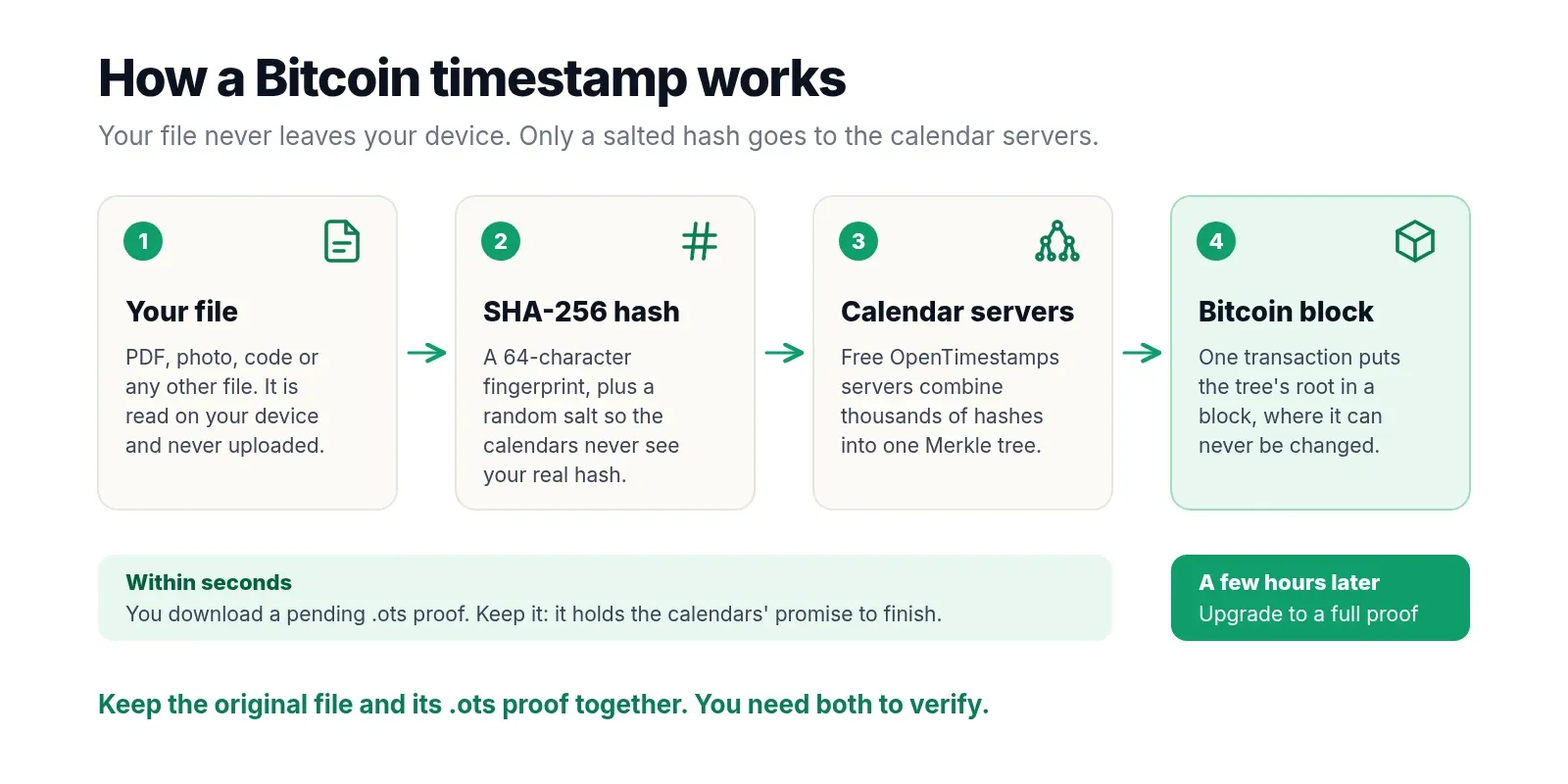
How OpenTimestamps works
Putting every hash in its own Bitcoin transaction would be slow and expensive. OpenTimestamps solves this with calendar servers that batch hashes together:
| Step | What happens |
|---|---|
| Hash | Your browser calculates the SHA-256 hash of the file. The file itself is never sent anywhere. |
| Salt | A random 16-byte salt is added and hashed again, so the calendars only see a value that reveals nothing. |
| Aggregate | Each calendar puts your salted hash into a Merkle tree with every other hash it received. |
| Anchor | The root of that tree goes into one Bitcoin transaction. Once it is mined, the block is your proof of time. |
The proof is a chain of small operations, such as "append these bytes" and "hash with SHA-256", that leads from your file's hash to the merkle root stored in a Bitcoin block header. Anyone can replay those steps. If they end at the real merkle root of that block, the file existed before the block was mined. Nobody can fake it later without rewriting the Bitcoin blockchain.
What is an OpenTimestamps .ots file?
The .ots file is your proof. It is a small binary file, usually a few hundred bytes, that holds the SHA-256 hash of your file, the random salt, and the list of steps up to the calendars or the Bitcoin block. It does not contain your file, so it is safe to share. A proof goes through two states:
- Pending: the proof ends at a calendar server's promise to include your hash in a future Bitcoin transaction. This is what you download right after stamping.
- Complete: the proof ends at a specific Bitcoin block. It no longer depends on the calendar servers and can be checked by anyone with a copy of the blockchain, even if OpenTimestamps disappears.
Do not confuse it with the .ots extension used by LibreOffice and OpenOffice for OpenDocument spreadsheet templates. Opening an OpenTimestamps proof in a spreadsheet program will not work.
Why your proof is pending, and how long it takes
Each calendar collects hashes for a while, combines them into one Merkle tree and then waits for its transaction to be mined. A Bitcoin block arrives about every 10 minutes on average, but the calendars also wait for low fees, so a new proof is usually confirmed within a few hours. When fees are high it can take longer. A pending proof is already useful: as long as you keep the .ots file, it can be upgraded at any later time, because the calendars keep the completed proofs.
To upgrade, add the file and the pending proof in Verify or upgrade a proof. If a calendar has confirmed it, the tool shows the Bitcoin block and offers Download upgraded proof (.ots). If not, it says which calendars it is still waiting on, and you can try again later.
How to verify an OpenTimestamps proof
Verifying needs two things: the original, untouched file and its .ots proof. With this tool, switch to Verify or upgrade a proof, add both and click Verify. It checks that the file matches the hash in the proof, replays the proof to the Bitcoin block, and compares the result with that block's merkle root. If everything matches, you see the block number and the time the block was mined.
For the strongest check, use the official command-line client with your own Bitcoin node, so you do not have to trust any website, including this one:
pip3 install opentimestamps-client
ots stamp contract.pdf            # creates contract.pdf.ots
ots upgrade contract.pdf.ots      # adds the Bitcoin confirmation
ots verify contract.pdf.ots       # needs a local Bitcoin Core node
ots info contract.pdf.ots         # shows every step in the proof
A successful check prints a line like Success! Bitcoin block 358391 attests existence as of 2015-05-28. A pruned Bitcoin Core node is enough. Proofs made with this tool and with the official client use the same format, so they work with both.
Bitcoin timestamp vs Rekor, RFC 3161 and eIDAS
| Method | Time to proof | Who you trust | How it is checked |
|---|---|---|---|
| OpenTimestamps (this tool) | A few hours, until a block confirms | Bitcoin itself, no single company | File plus the .ots proof |
| Sigstore Rekor | Seconds | The Sigstore public log | Search the log by hash or index |
| RFC 3161 timestamp authority | Seconds | One timestamp company | Signed token from that company |
| Qualified eIDAS timestamp | Seconds | A certified EU provider | Legal presumption in the EU, paid |
A Bitcoin timestamp is slower than the others but does not rely on any single company staying in business or keeping its keys safe. If you need a result in seconds, the Document Timestamp tool records a PDF or Word file's hash in the public Sigstore Rekor log instead. An RFC 3161 timestamp is a signed token from one timestamp authority, and a qualified timestamp under the EU eIDAS rules is a paid service with a built-in legal presumption. For every method side by side, see our guide on how to prove a file existed on a date.
What a Bitcoin timestamp proves, and what it does not
- It proves that this exact file existed no later than the time of the Bitcoin block in the proof, and that it has not changed since.
- It does not prove who created the file. Nothing in the proof is linked to your name.
- It does not prove the file did not exist earlier. The date is an upper limit, not the moment the file was created.
- It is not exact to the second. The block time is accurate to within a couple of hours, which is plenty for showing that you had a design, a manuscript, a dataset or a piece of code first.
Your file stays private
The file is read and hashed in your browser, and PickZeal does not receive the file, the hash or the proof. When you create a timestamp, the calendar servers receive a salted hash and, like any website, your IP address. Because of the random salt, that value cannot be matched to your file, even by someone who has a copy of it. When you verify, the tool asks the calendars named in the proof for the completed proof, and asks mempool.space or blockstream.info for the merkle root of one Bitcoin block.
Need a fingerprint of a piece of text instead of a file? Try the Text to MD5 Hash Generator, or see all free in-browser tools.
Frequently asked questions
How do I timestamp a file on the Bitcoin blockchain for free?
Add the file to this tool and click Create Bitcoin timestamp. Your browser hashes the file, adds a random salt and sends only that salted hash to the free OpenTimestamps calendar servers. You download a small .ots proof file straight away. The calendars combine your hash with thousands of others and record them in a single Bitcoin transaction, usually within a few hours, so you pay nothing.
What is an .ots file?
In this context an .ots file is an OpenTimestamps proof. It holds the SHA-256 hash of your file and the chain of steps that links that hash to a Bitcoin block. It is not the file itself and it is only a few hundred bytes. The same extension is also used for OpenDocument spreadsheet templates from LibreOffice, which are a completely different thing.
How long does an OpenTimestamps proof take to confirm?
Usually a few hours. The calendar servers collect hashes, combine them and then wait for their transaction to be mined in a Bitcoin block. When fees are high it can take longer. Until then the proof is pending. Come back later, verify the file with the same .ots proof, and this tool fetches the Bitcoin confirmation and lets you download the upgraded proof.
How do I verify an OpenTimestamps proof?
Switch this tool to Verify or upgrade a proof, add the original file and its .ots proof, and click Verify. The tool checks that the file matches the proof, follows the proof to its Bitcoin block and compares the result with that block's merkle root from a public block explorer. On the command line, run ots verify file.ots with the opentimestamps-client, which checks the block against your own Bitcoin node.
Is my file uploaded?
No. The file is read and hashed in your browser on your own device. When you create a timestamp, only a salted hash goes to the OpenTimestamps calendars, so they never see even the real hash of your file. PickZeal does not receive the file, the hash or the proof.
What happens if I lose the .ots proof?
Keep the .ots file safe, because it cannot be rebuilt. The random salt that keeps your hash private is stored only inside the proof, so without it nobody, including the calendar servers, can link your file to the Bitcoin transaction. Store the proof next to the original file, and keep a copy of the upgraded proof once it is confirmed.
Why does my file no longer match its proof?
The proof only matches the exact same bytes. Re-saving a document, exporting a new PDF, resizing a photo or letting a cloud drive convert the file all change the bytes and give a completely different SHA-256 hash, even if the file looks the same. Timestamp the final version and keep that copy untouched.
Who pays the Bitcoin fees?
The calendar servers do. They are run as a free public service by the OpenTimestamps project and Eternity Wall. Because one Bitcoin transaction covers every hash a calendar received in that period, the cost per timestamp is tiny, so stamping is free and needs no account, wallet or API key.
Is a Bitcoin timestamp legally valid?
It is strong technical evidence that a file existed no later than a given Bitcoin block, and anyone can check it without trusting a company. It is not a qualified electronic timestamp under the EU eIDAS rules, and it does not prove who created the file. For contracts or court cases, ask a lawyer whether you also need a qualified timestamp or a notary.
Topic
More on File Timestamping
- GuideFree Blockchain Timestamp: 8 Services Compared (2026)Free ways to timestamp a file on the Bitcoin blockchain, plus faster non-blockchain options, compared: cost, sign-up, time to proof and independent checking.
- Document TimestampProve a PDF or Word file existed on a date. Its SHA-256 hash is recorded in the public Sigstore Rekor log. Free, and the file never leaves your device.
More text and code tools
View all tools- QR Code GeneratorTurn any link or text into a QR code and download it as PNG or SVG. Static codes that never expire and carry no tracking. Free, private.
- Text to Hex ConverterConvert text to hex and back. See the UTF-8 bytes, Unicode code points and HTML entities of any character, emoji included. Free and private.
- Base64 Encode and DecodeEncode text to Base64 or decode Base64 to text, with UTF-8, emoji and URL-safe Base64URL support plus a Basic auth header builder. Free, private.
- Text to MD5 Hash GeneratorConvert text to an MD5 hash as you type. Hash a whole list at once, add a salt, or check text against an existing hash. Free, nothing is uploaded.
- Document TimestampProve a PDF or Word file existed on a date. Its SHA-256 hash is recorded in the public Sigstore Rekor log. Free, and the file never leaves your device.